CustomGPT.ai Review (2026): Is It Worth $99 a Month for Writing From Your Own Sources?
CustomGPT.ai turns your documents, websites and videos into an AI agent that answers — and drafts — only from that material, with a citation on every reply. We checked every plan limit, the one independent test behind its "#1" claim, the cost per question, and which jobs get their money back.
Affiliate disclosure: some links on this page earn us a commission if you buy, at no extra cost to you. It never changes our verdict. How we make money.
Not the best AI writer — one of the better AI researchers that write. Worth $99 a month if you draft repeatedly from a large library you own.
Worth it if you
- Write from hundreds of your own documents, pages or videos
- Need every claim traceable to a source
- Want the same agent to answer readers, students or clients
Skip it if you
- Write occasionally from a handful of files
- Mostly need polished or creative prose
- Handle patient data (HIPAA is not stated)
| CustomGPT.ai at a glance | |
|---|---|
| Price | Standard $99/mo ($89 annual) · Premium $499/mo ($449 annual) · Enterprise custom |
| Queries | 1,000/mo Standard, 5,000/mo Premium · extra 2,500 for $375 (≈$0.15 each) |
| Sources | 5,000 documents per agent and 60M words (Standard) · 1,400+ formats · websites, Drive, YouTube |
| Accuracy evidence | Tonic.ai, Feb 2024: 4.4/5 vs 3.5/5 for OpenAI Assistants (55 questions) |
| Security | SOC 2 Type 2 and GDPR on all plans · no training on your data · HIPAA not stated |
| Biggest gaps | No free plan, tight query limits, branding on Standard, very few public user reviews |
Most people meet AI writing tools the same way. You ask a question, you get a confident, well-written paragraph, and then you spend twenty minutes finding out which parts are true. For a blog post about productivity tips, that is annoying. For a grant proposal, a compliance manual, a lecture handout, a client report or a policy answer, it is the whole problem.
CustomGPT.ai is built around the opposite idea. You give it a body of material you trust — your PDFs, your website, your help center, your Google Drive, your YouTube lectures — and it builds an agent that answers from that material alone, with a link to the source behind every answer. If the answer isn't in your sources, it is supposed to say so.
That makes it less of a "writing tool" in the usual sense and more of a research assistant that happens to write. For some kinds of written work, that is exactly what you want. For others, it is an expensive way to do what a $20 chatbot already does.
This review tries to draw that line clearly. I read the pricing page, the documentation and the changelog (all checked October 29, 2026), the only independent benchmark the company cites, the user reviews on G2, Capterra and Trustpilot, and the published limits of the four tools people most often compare it with. Then I did the arithmetic: what one question costs, how many questions a real writing project uses, and who comes out ahead.
One thing up front: this is a pre-purchase research review. I'm reporting what the vendor publishes, what independent testers measured and what users say. Where I give a number, I say where it came from. Where the vendor is silent, I say that too.
1. The 60-second verdict
- What it is: a no-code platform for building AI agents grounded in your own content (the technical term is RAG — retrieval-augmented generation). Agents can be used privately, embedded on a website, connected to Slack, or called through an API.
- Price: Standard is $99/month ($89/month billed annually); Premium is $499/month ($449 annually); Enterprise is custom. There is no free plan — only a 7-day trial that needs a credit card and bills automatically when it ends.
- The real strength: answers and drafts that stay inside your sources and cite them. In the one independent test (Tonic.ai, February 2024, 55 questions), CustomGPT.ai averaged 4.4 out of 5 for answer accuracy against 3.5 for OpenAI's Assistants, with only 6 weak answers versus 21.
- The real limits: 1,000 queries a month on Standard, extra queries at about $0.15 each, the "Powered by CustomGPT.ai" badge unless you pay $499, very few public user reviews, and a benchmark that is now more than two years old.
- Who wins: people who write repeatedly from a large, stable body of documents — researchers and lecturers, grant writers, technical writers, compliance and HR teams, consultants, support teams, and agencies that can resell agents to clients.
- Who doesn't: anyone who writes occasionally from a handful of files. For that, ChatGPT Plus, Claude Pro or the free NotebookLM do most of the job for $0–$20 a month.
If you want to see the current plans before reading further, the official CustomGPT.ai pricing and trial page is the place to check — prices on AI tools move often.
2. What CustomGPT.ai actually is (and isn't)
The name causes confusion, so let's clear it up first. CustomGPT.ai is not OpenAI's "custom GPTs" feature inside ChatGPT. It is a separate company and a separate product. It uses large language models from OpenAI and others underneath, but the part you pay for is everything around the model:
- Ingestion: it reads your material — the homepage says it handles 1,400+ document formats, including PDFs, Microsoft Office files, Google Docs, websites through their sitemaps, help desks, knowledge bases, YouTube videos, audio and podcasts.
- Retrieval: when someone asks a question, it finds the passages in your material that are most relevant and gives only those to the model.
- Grounded answering: the model is instructed to answer from those passages, not from its general training. The company's FAQ says agents "cite the sources behind every answer" and that it will not train any model on your data.
- Deployment: the finished agent can live as a private chat for your team, a widget on your website, a Slack bot, a private portal, an API endpoint or an MCP server for other AI tools.
Think of it this way. A general chatbot is a very well-read stranger: articulate, fast and often right, but you can't tell which of its sentences came from where. A CustomGPT.ai agent is closer to a junior assistant who has read your filing cabinet and only your filing cabinet, and who staples a photocopy of the page to every answer.
That design choice is the whole product. It is also why the company's marketing leans so hard on "anti-hallucination." The homepage calls it "#1 in accuracy and anti-hallucinations" — a claim we'll test against the evidence in a moment.
What changed in 2026
The changelog shows the product moving from "chatbot over your documents" toward "agent that does multi-step work." In May 2026 it added:
- Plan & Act mode: an agent can plan a multi-step task, run actions and tools, and stream results as it works. Each query is capped at 5 tasks on Standard, 10 on Premium and 15 on Enterprise.
- Clean stops: if an agent runs out of actions mid-task, it stops, returns partial findings with citations, and asks whether to continue.
- Source priority from personas: if your persona instructions say "check the 2026 policy manual first," retrieval now respects that.
There is also a separate product, CustomGPT.ai Researcher, aimed squarely at long-form writing. Its documentation says it analyzes 200+ sources per article, reviews more than 1.4 million words per research run, and takes about 38 minutes per run. The free tier allows 1 article a day and 5 a month; the premium tier adds your own knowledge base. It's worth knowing about, but this review focuses on the main platform.
3. Plans, prices and limits (checked October 29, 2026)
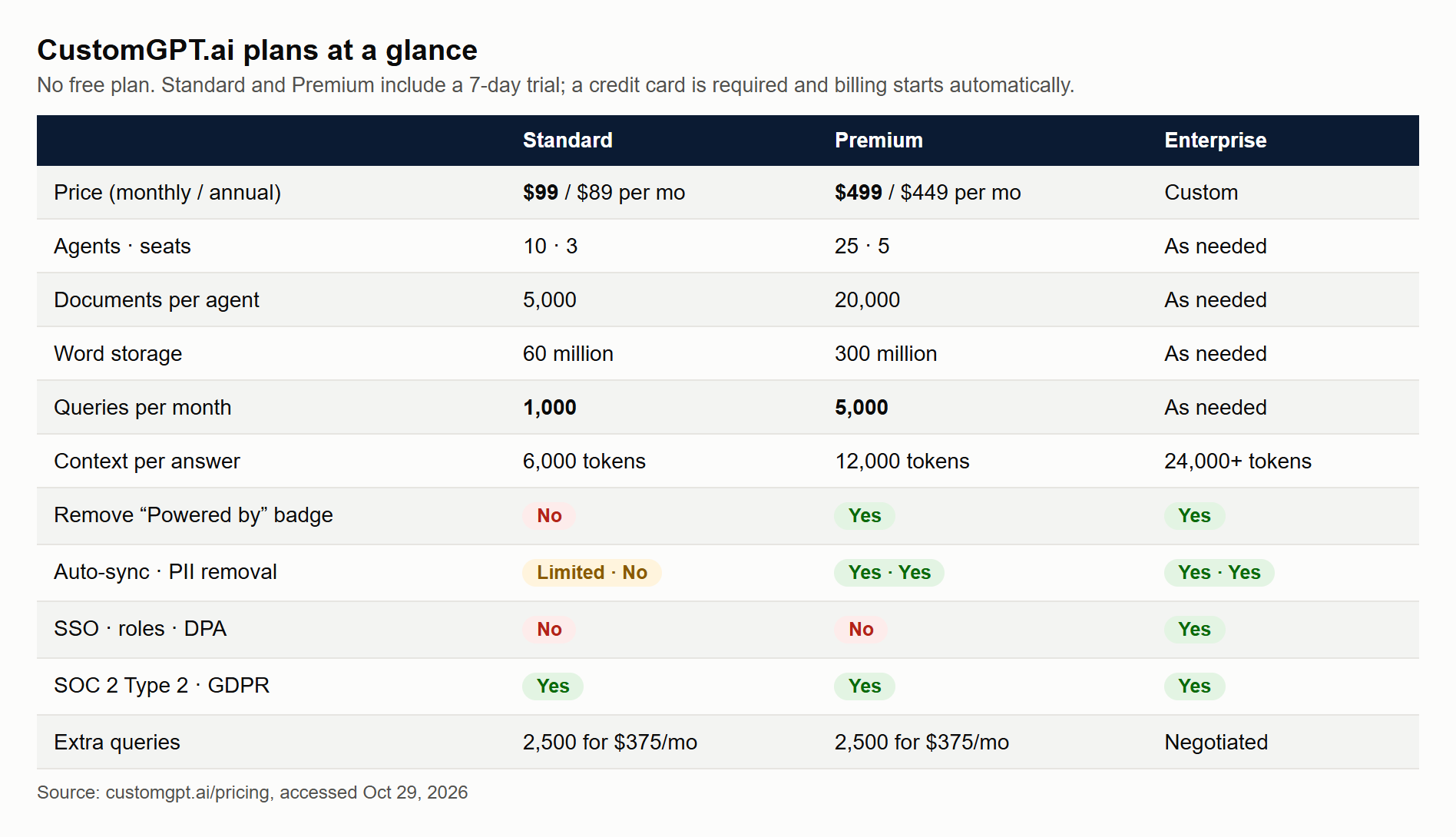
Here is everything on the pricing page that matters for writing work.
| Standard | Premium | Enterprise | |
|---|---|---|---|
| Price, billed monthly | $99/mo | $499/mo | Custom |
| Price, billed annually | $89/mo ($1,068/yr) | $449/mo ($5,388/yr) | Custom |
| Agents | 10 | 25 | As needed |
| Documents per agent | 5,000 | 20,000 | As needed |
| Words of storage | 60 million | 300 million | As needed |
| Queries per month | 1,000 | 5,000 | As needed |
| Team seats | 3 | 5 | As needed |
| Context depth per answer | 6,000 tokens | 12,000 tokens | 24,000+ tokens |
| Image citations (AI Vision) | 500/mo | 2,500/mo | As needed |
| Analytics history | 7 days | Full | Full |
| Remove "Powered by" badge | No | Yes | Yes |
| Auto-sync of sources | Limited | Yes | Yes |
| PII removal | No | Yes | Yes |
| SSO, roles, data processing agreement | No | No | Yes |
| SOC 2 Type 2 + GDPR | Yes | Yes | Yes |
Add-ons (on Standard or Premium): 2,500 extra queries for $375/month, 300 million extra words of storage for $300/month, 100,000 extra documents for $100/month, 25 extra agents for $100/month, and 5 extra seats for $100/month.
The trial: Standard and Premium both come with a 7-day free trial with full access to that plan's features. A credit card is required at sign-up, you are charged automatically when the trial ends, and you cancel from the billing page with "Cancel Subscription." Trial support is described as limited.
Three things in that table deserve a second look.
Storage is generous; queries are not. Sixty million words is roughly 750 full-length books. Almost no individual writer will hit that. A thousand queries a month, on the other hand, is about 33 a day. If you draft interactively — asking, refining, asking again — you can burn 30 queries on a single section of a report.
Context depth limits how much the agent "sees" at once. On Standard, each answer is built from up to 6,000 tokens of retrieved material — very roughly 4,500 words. That is plenty for a precise answer or a section draft. It is not enough to synthesize an entire 200-page archive in one pass. For long documents you work section by section, which is the right way to write with any AI anyway.
HIPAA is not mentioned on the pricing page or homepage. If you work with patient data, treat that as a "no" until the company tells you otherwise in writing.
4. What one question really costs
Monthly prices are hard to compare across AI tools because they meter different things. The fairest unit for a grounded agent is the cost of one answered question.
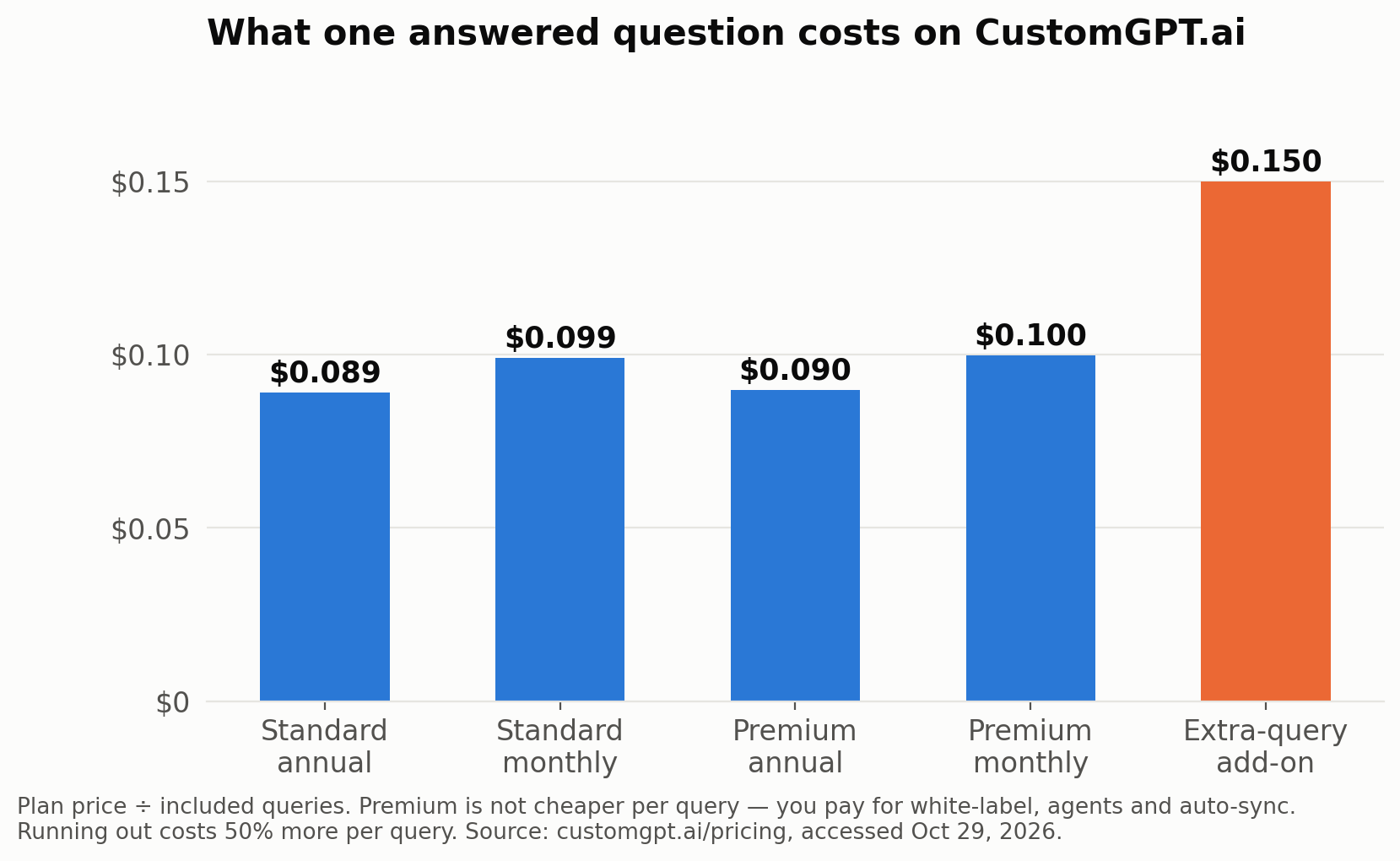
| Plan or option | Price | Included queries | Cost per query |
|---|---|---|---|
| Standard, annual billing | $89/mo | 1,000 | $0.089 |
| Standard, monthly billing | $99/mo | 1,000 | $0.099 |
| Premium, annual billing | $449/mo | 5,000 | $0.090 |
| Premium, monthly billing | $499/mo | 5,000 | $0.100 |
| Extra-query add-on | $375/mo | 2,500 | $0.150 |
Two conclusions follow.
Premium is not cheaper per query. At about nine to ten cents either way, you upgrade to Premium for the white-label badge, more agents, auto-sync, PII removal and deeper context — not to save money on questions.
Running out is expensive. The add-on costs 50% more per query than the plan itself. User reviews also report that agents stop answering when the limit is reached. If your agent is public — on a website or a course portal — set a usage alert and decide in advance what happens on day 25 of a busy month.
To put ten cents in perspective for a writer: if a query saves you even two minutes of looking something up and checking it, you are paying the equivalent of $3 an hour for research help. The question is never whether ten cents is cheap. It's whether you'll use enough of the 1,000 to make $99 worth it.
5. The accuracy claim, checked
The homepage calls CustomGPT.ai "#1 in accuracy and anti-hallucinations," but does not cite a source on the page. The evidence behind it is a single benchmark run by Tonic.ai, a data company that published a series of RAG evaluations using its open-source tool, Tonic Validate.
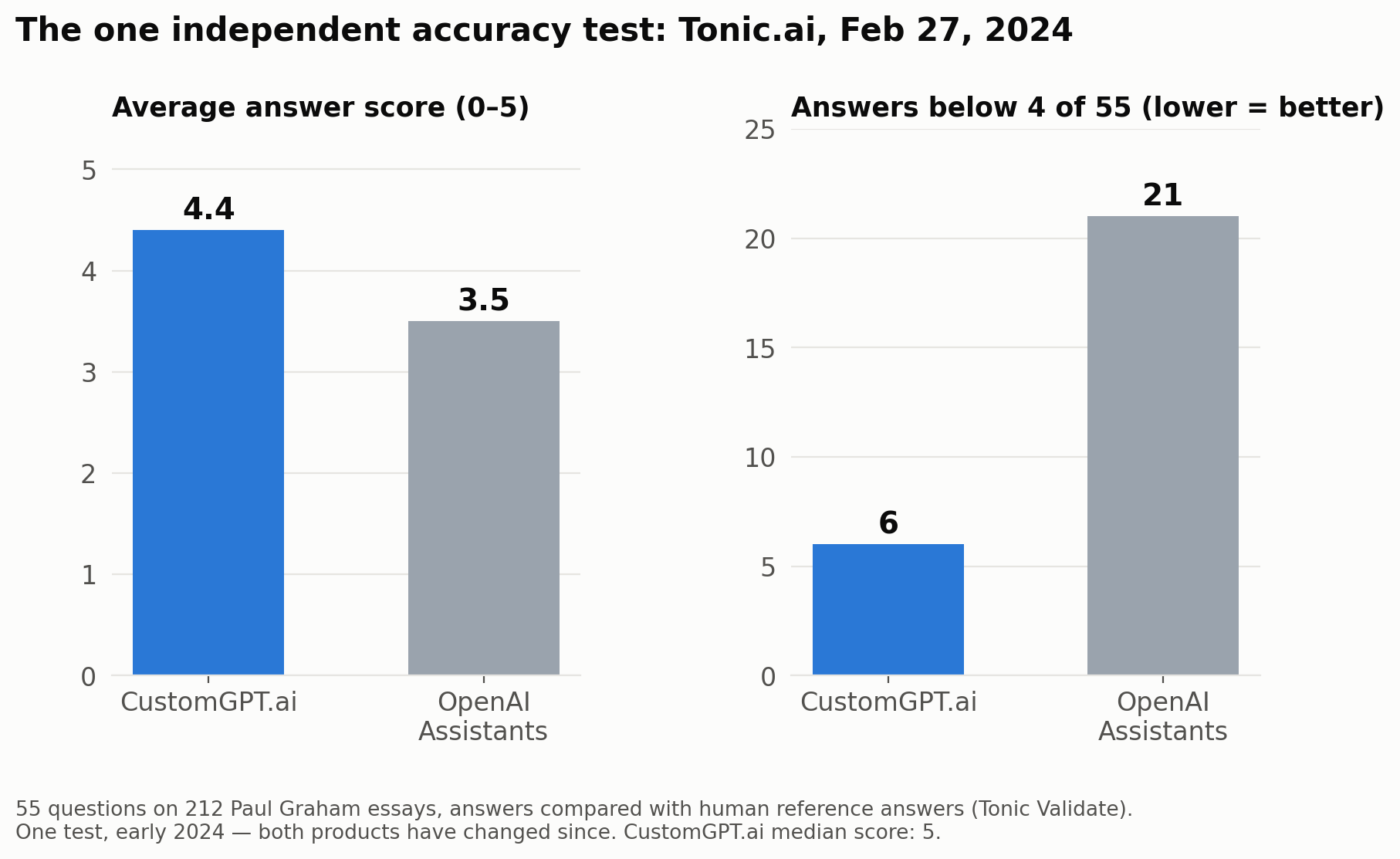
| CustomGPT.ai | OpenAI Assistants | |
|---|---|---|
| Test date | February 27, 2024 | February 27, 2024 |
| Material | 212 Paul Graham essays | Same, merged into one file |
| Questions | 55, each with a human reference answer | Same 55 |
| Metric | Answer similarity, 0–5 | Same |
| Average score | 4.4 | 3.5 |
| Median score | 5 | Not reported |
| Answers scoring below 4 | 6 | 21 |
Source: Tonic.ai, "RAG Evaluation Series: Validating the RAG Performance of OpenAI vs CustomGPT.ai."
That is a meaningful gap. Fewer than one answer in nine fell below "good" for CustomGPT.ai, compared with more than one in three for OpenAI's Assistants. Tonic's author also noted that a median of 5 was something "not seen before" among the systems they had evaluated.
Now the caveats — and the author of the test lists most of them himself:
- It is one test of 55 questions, run in early 2024. Both systems have changed since. OpenAI's tools in particular have been rebuilt more than once.
- The material was a single, clean, English text collection. Your archive of scanned PDFs, slide decks and spreadsheets is harder.
- OpenAI's Assistant was limited to 20 files at the time, so the 212 essays had to be merged into one file — a handicap for that side.
- It compares a no-code product with a developer-built setup, not identical pipelines. CustomGPT.ai uses OpenAI's models underneath; its edge comes from its own retrieval and prompting.
- Both systems scored 1 out of 5 on the same hard question. Grounding reduces errors. It doesn't eliminate them.
The company's own documentation is refreshingly honest about that last point: citations, it says, reduce the effort needed to verify an answer, but they do not prove that every answer is correct. For writing, that's the right mental model. The citation is not a guarantee. It's a shortcut to checking.
My reading: the evidence supports "noticeably better than a plain do-it-yourself setup at staying on-source, as of 2024." It does not support "#1" in 2026 without a fresh test. If accuracy is your reason for buying, use the 7-day trial to run your own 20-question test against your own documents (there's a method later in this review).
6. Why it's strong for written work
Most AI writing tools are optimized to sound good. CustomGPT.ai is optimized to be traceable. For a specific kind of writing, that changes the economics of the work.
1. Every claim comes with its receipt
Answers can carry numbered references inside the text or a list of sources after it, and administrators choose whether source titles and links are shown. When you are drafting a report, you don't have to ask "where did this come from?" — you click. That is the difference between checking a paragraph in thirty seconds and checking it in ten minutes.
2. It can say "I don't know"
You can customize the "I don't know" message, and the ready-made Research Analyst persona in the documentation tells the agent to cite what it found rather than fill gaps with speculation. For writing, an honest gap is gold: it tells you exactly where you need to do more reading, instead of hiding the gap under fluent prose.
3. It works across a library, not a handful of files
ChatGPT's custom GPTs accept up to 20 knowledge files per GPT. NotebookLM's free plan allows 50 sources per notebook. CustomGPT.ai Standard allows 5,000 documents per agent and 60 million words of storage — plus whole websites through their sitemaps and YouTube channels. If your writing depends on years of accumulated material, that difference in scale is the main reason to pay.
4. Your voice, set once
The persona settings let you define tone, response style, personality and language once, and every draft follows them. The platform supports 92 languages, so a team can draft in English and answer readers in Spanish, Arabic or Indonesian from the same sources.
5. The same agent writes and answers
This is the underrated part. The agent you use to draft a staff handbook can be the agent that answers staff questions about it afterwards. The agent you use to write a course guide can answer your students at 11 p.m. Writing and support stop being two separate jobs.
6. It keeps your sources current
On Premium and Enterprise, auto-sync re-reads connected sources — Google Drive, SharePoint, OneDrive, Confluence, Zendesk, websites — so drafts reflect the current version of a policy, not last year's. Standard has integrations but without auto-sync, so you re-upload when something changes.
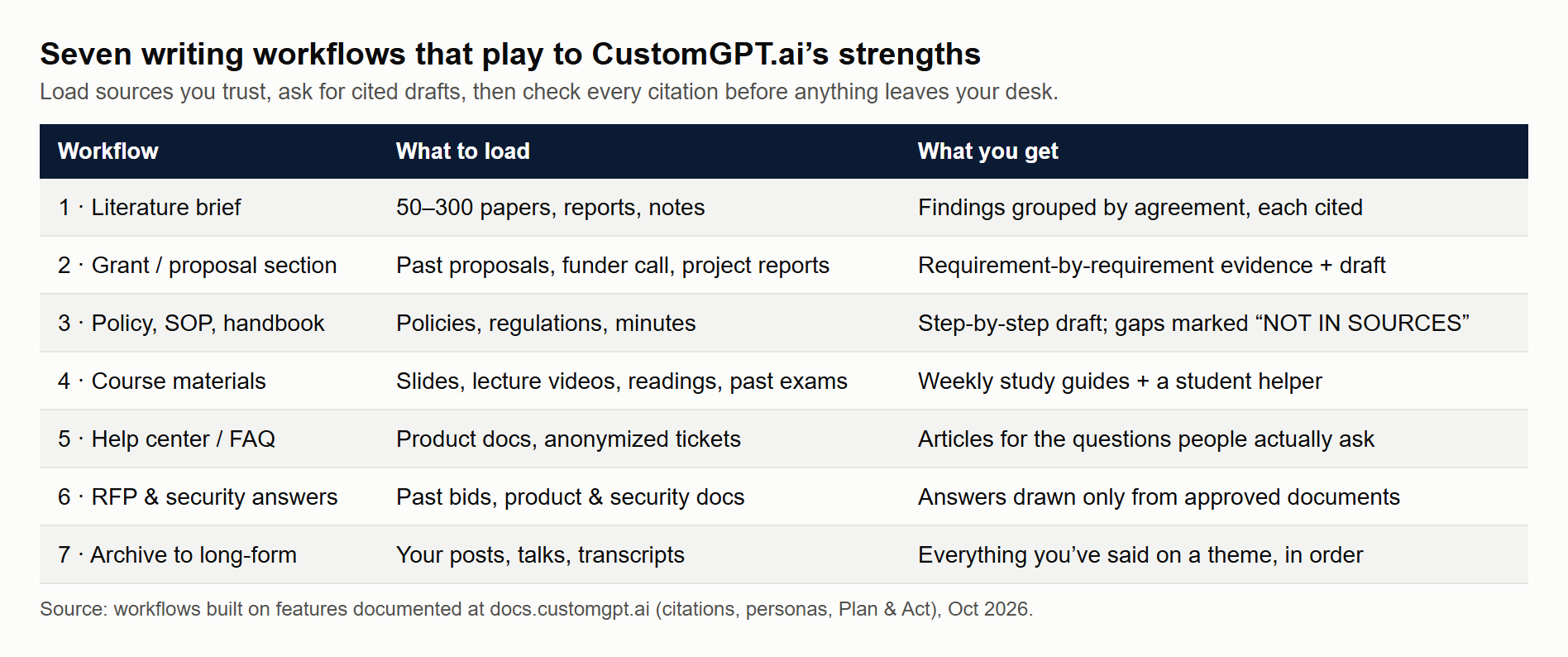
7. Seven writing workflows that play to its strengths
Here is how the strengths above turn into actual written output. Each workflow lists what to load, what to ask, and what to check.
Workflow 1 — The literature brief
Load: the 50–300 papers, reports and notes you've collected for a project.
Ask: "List every finding in my sources about [topic], with the paper and page for each. Group them into agreements and disagreements." Then: "Draft a 400-word synthesis of the agreements, citing each claim."
Check: open every citation. Make sure the claim matches the page and isn't from a paper's literature review quoting someone else. Rewrite the synthesis in your own voice — the agent's draft is your notes, not your paper.
Workflow 2 — The grant or proposal section
Load: your past funded proposals, the funder's call and guidelines, your CV and project reports.
Ask: "Using only the call text, list every requirement for the 'Impact' section. Then list evidence from our past reports that meets each one." Then draft section by section.
Check: every number and outcome against the original report. Funders read past proposals too, so avoid recycled paragraphs.
Workflow 3 — The policy, SOP or staff handbook
Load: existing policies, regulations that apply to you, meeting minutes where decisions were made.
Ask: "Draft a step-by-step procedure for [process] based on the policies. Mark any step that is not covered by a source as 'NOT IN SOURCES'."
Check: with the person who owns the process. The "NOT IN SOURCES" markers become your list of decisions still to make.
Workflow 4 — Course materials and study guides
Load: lecture slides, recorded lectures (YouTube or audio), readings, past exam questions.
Ask: "Write a one-page study guide for Week 5 with key terms, three worked examples and five practice questions, each referenced to the slide or lecture."
Check: the practice questions for ambiguity. Then publish the same agent as a student helper.
Workflow 5 — Help center and FAQ articles
Load: your product documentation, support tickets (anonymized) and release notes.
Ask: "Which questions appear most often in the tickets that our documentation does not answer clearly? Draft an article for each, citing the documentation."
Check: with a support lead. This is the workflow where the analytics (full history on Premium) earn their keep — real questions tell you what to write next.
Workflow 6 — Proposals, RFP and security-questionnaire answers
Load: past winning proposals, case studies, product sheets, your security and compliance documents.
Ask: paste each question from the RFP and ask for an answer "using only our approved documents, with sources."
Check: pricing, dates and commitments — never let an AI promise something on your behalf.
Workflow 7 — Newsletters, reports and books from your own archive
Load: everything you've already published — blog posts, talks, transcripts, columns.
Ask: "Find everything I've written about [theme], in date order, with links. Suggest an outline for a long-form piece that connects them."
Check: that the piece adds something new. An archive agent is brilliant at reminding you what you already said; the new idea still has to be yours.
When you're ready to try one of these workflows on your own documents, start the CustomGPT.ai 7-day trial here — and put the cancellation date in your calendar the same day.
8. A worked example: one lecturer, one semester
Numbers make the decision easier, so here's a realistic scenario. The figures are illustrative; the prices are the real ones from the pricing page.
The setup. A university lecturer teaches a course with 120 students. They load 14 weeks of slides, 28 recorded lectures, 40 readings and three years of past exams — about 1.5 million words, far below the 60-million-word Standard limit.
The writing. Over the semester, the lecturer uses the agent to draft 14 weekly study guides, 3 exam reviews and a revised course handbook. At roughly 25 queries per guide (asking, refining, generating practice questions), that's about 450 queries for the whole semester's writing — about 110 a month.
The student helper. The same agent is embedded in the course portal. If each student asks 6 questions a month, that's 720 queries a month.
The total. About 830 queries a month — inside the 1,000 included on Standard.
| Item | Per month |
|---|---|
| Lecturer drafting | ~110 queries |
| 120 students × 6 questions | ~720 queries |
| Total | ~830 of 1,000 included |
| Cost on Standard (monthly billing) | $99 |
| Cost per student | about $0.83 |
| Lecturer time saved on drafting (assume 3 hours a guide → 1 hour) | ~8 hours |
If those 8 hours are worth even $25 an hour to the lecturer, the time alone is worth $200 a month against a $99 bill — before counting the questions students no longer email.
Now change one assumption. If students ask 10 questions a month instead of 6, the course needs about 1,310 queries. The extra 310 aren't available in small amounts — the add-on is 2,500 queries for $375. The bill jumps from $99 to $474. That's the cliff to plan for: either cap student use, or split the course across two Standard accounts, or move to Premium.
9. Who benefits — by profession
The pattern is simple: CustomGPT.ai pays off when you write repeatedly from a large body of material that you, not the internet, own. Here's how that plays out across jobs.
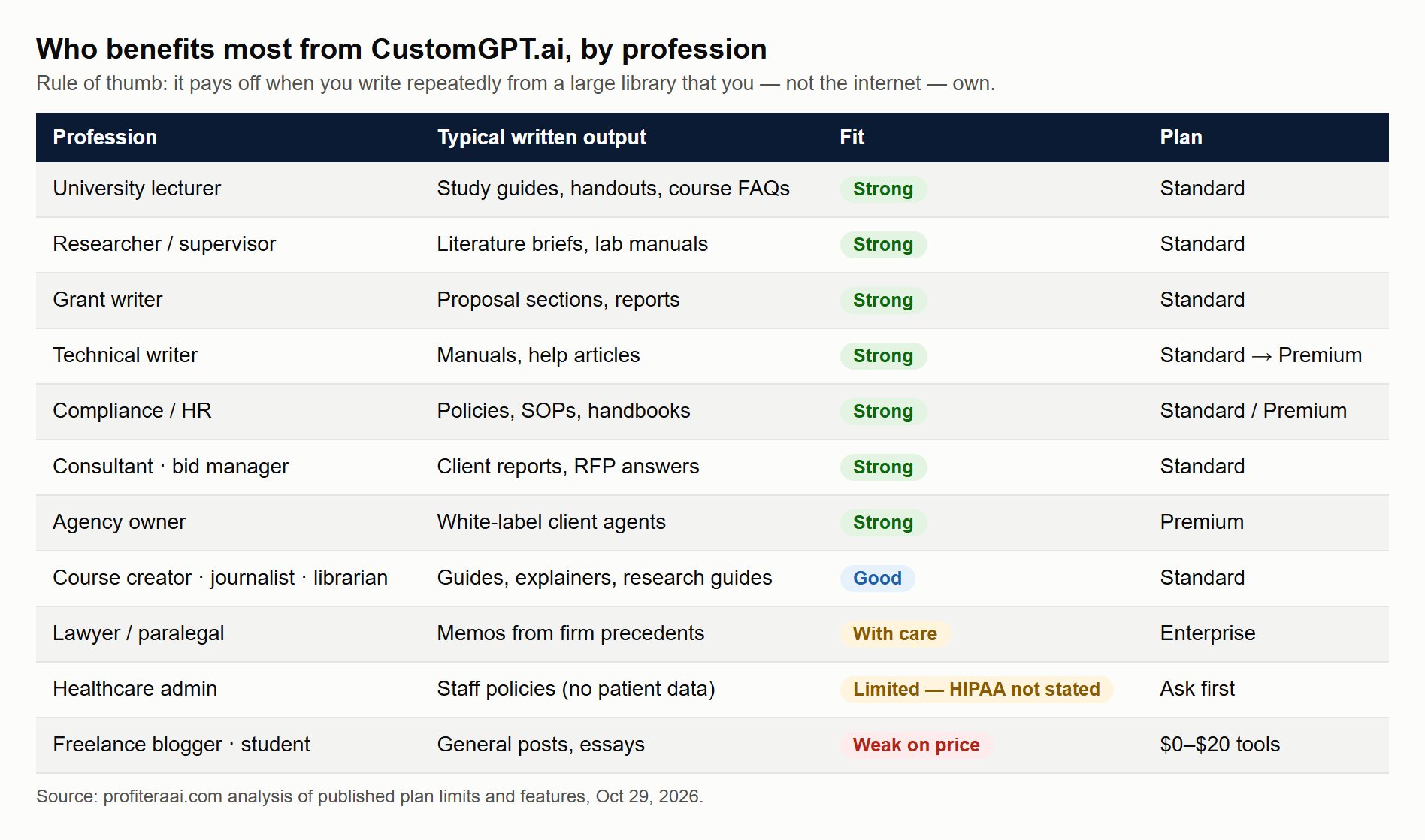
| Profession | What they write | What they'd load | Fit | Plan |
|---|---|---|---|---|
| University lecturer | Study guides, handouts, exam reviews, course FAQs | Slides, lecture videos, readings | Strong | Standard |
| Researcher / PhD supervisor | Literature briefs, related-work sections, lab manuals | Paper collections, lab notes, protocols | Strong | Standard |
| Grant writer | Proposal sections, impact statements, reports | Past proposals, funder calls, project reports | Strong | Standard |
| Technical writer | Manuals, help articles, release notes | Product docs, specs, tickets | Strong | Standard → Premium |
| Compliance / policy officer | Policies, SOPs, audit answers | Regulations, internal policies, minutes | Strong | Premium (PII removal) |
| HR manager | Handbooks, onboarding guides, policy answers | Employee handbook, benefits docs | Strong | Standard |
| Consultant | Client reports, proposals, frameworks | Past deliverables, methods, case studies | Strong | Standard |
| Agency owner | Client chatbots, content for clients | Each client's site and docs | Strong (resell) | Premium (white-label) |
| Customer support lead | Help center articles, macros | Docs, anonymized tickets | Strong | Premium (analytics) |
| Sales / bid manager | RFP and security-questionnaire answers | Past bids, product and security docs | Strong | Standard |
| Course creator / coach | Course guides, community answers | Course videos, workbooks | Good | Standard |
| Journalist / newsroom | Background briefs, explainers from archives | Published archive, public records | Good | Standard |
| Librarian / knowledge manager | Research guides, collection answers | Catalog, guides, institutional repository | Good | Standard |
| Lawyer / paralegal | Research memos, clause comparisons | Firm's own precedents and templates | Good, with care | Enterprise (DPA, access control) |
| Nonprofit program officer | Donor reports, program FAQs | Program reports, evaluations | Good | Standard |
| Healthcare administrator | Staff policies, patient-facing FAQs (no patient data) | Public policies, procedures | Limited | Ask about HIPAA first |
| Freelance blogger | Blog posts on general topics | Few or no own sources | Weak | Use a $20 chatbot |
| Student | Essays, theses | Course readings | Weak on price | Use NotebookLM (free) |
A few of these deserve a sentence more.
Lecturers and researchers get the clearest return, because they already own exactly the kind of material the tool is built for, and the same agent can serve students afterwards. Among the logos on the homepage are several universities — the University of Virginia, Lehigh University and MIT — although logos alone don't tell you how each organization uses it.
Agencies are the group the company most obviously courts. White-label agents on Premium mean you can build a knowledge agent for a law firm, a clinic or a school and charge a monthly fee for running it. At $499 a month for 25 agents, the platform cost is about $20 per client agent if you fill them all. The Endurance Group, a named customer, reports a "300% increase in workflow efficiency" and "4–5x more outreach volume per client" — vendor-published figures, but they show what the model looks like.
Compliance, HR and support teams benefit because their writing must match an approved source word for word, and the agent's answers point back to it. The named customer GEMA reports 248,000+ queries, 6,000+ hours saved a year and an 88% query success rate — again published by the vendor, but a useful order of magnitude.
Lawyers and healthcare workers can benefit, but carefully. A firm's own precedents are a perfect source library; client data is a different matter. Enterprise adds a data processing agreement, SSO and access controls. HIPAA isn't mentioned anywhere on the public pages. Nothing an agent drafts is legal or medical advice until a qualified person signs it.
Students and casual bloggers are the weakest fit — not because the tool can't help them, but because free or $20 tools do nearly the same job at their scale. A student with 30 readings is well served by the free NotebookLM. A blogger writing from general knowledge doesn't need retrieval at all.
10. How it compares with ChatGPT, Claude, NotebookLM and Chatbase
These are the tools people most often weigh against CustomGPT.ai. Prices are the published U.S. prices as of October 2026; check each vendor's page before you buy.
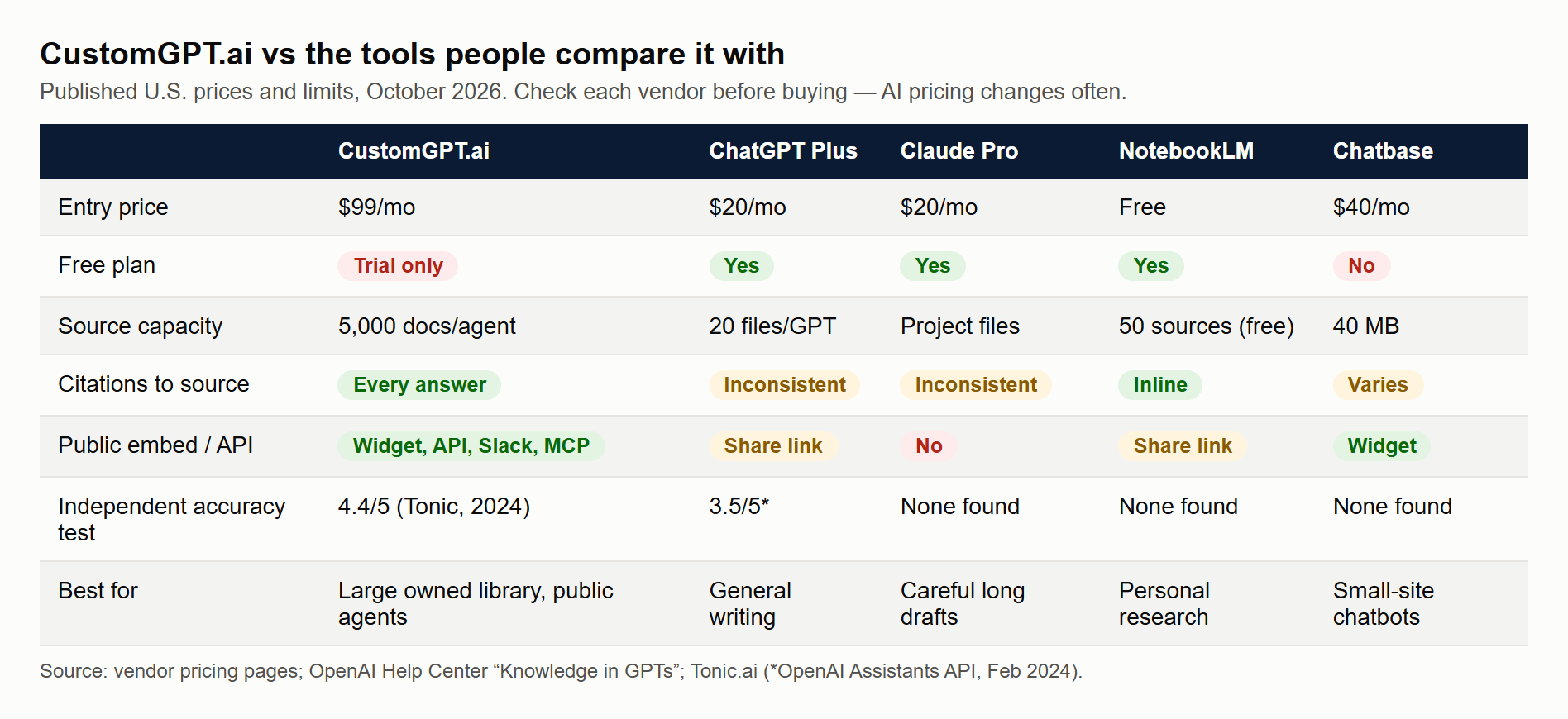
| CustomGPT.ai | ChatGPT Plus (custom GPTs) | Claude Pro (Projects) | NotebookLM | Chatbase | |
|---|---|---|---|---|---|
| Entry price | $99/mo ($89 annual) | $20/mo | $20/mo ($17 annual) | Free; more via Google AI plans from $4.99/mo | $40/mo ($32 annual) |
| Free plan | No (7-day trial, card required) | Yes, limited | Yes, limited | Yes | No |
| Source capacity | 5,000 docs per agent, 60M words | 20 files per GPT, 512 MB each | Project knowledge files | 50 sources per notebook (free), 500,000 words each | 40 MB training data |
| Websites and YouTube as sources | Yes (sitemaps, YouTube, Vimeo) | Browsing, not indexed | Limited | Yes (web and YouTube sources) | Websites |
| Citations to your source | Every answer, configurable | Inconsistent | Inconsistent | Yes, inline | Varies |
| Public embed / widget | Yes, plus API, Slack, MCP | Share link to ChatGPT users | No | Share link | Yes |
| Remove vendor branding | Premium ($499) | n/a | n/a | n/a | $1,188/yr add-on |
| Independent accuracy test | Tonic.ai 2024: 4.4/5 | Tonic.ai 2024 (Assistants): 3.5/5 | None found | None found | None found |
| Best for | Repeated writing from a large owned library; public agents | General writing and brainstorming | Long, careful drafting and editing | Personal research from a few dozen sources | Simple website chatbots |
The honest summary:
- For drafting quality and style, a general model like ChatGPT or Claude at $20 is hard to beat. They are better editors and better at prose that sounds like a person.
- For research from a modest pile of sources, NotebookLM's free tier is the value champion. Fifty sources with inline citations covers most individual projects.
- For website chatbots on a budget, Chatbase starts lower, but its per-message credits and 40 MB data limit fit small sites better than document libraries.
- CustomGPT.ai earns its price at scale and in public: thousands of documents, whole websites and video channels, a team, an API, an agent your readers or customers can use, and citations on every answer.
Many people end up with two tools: a $20 general chatbot for polishing prose, and a grounded agent for anything that has to be traceable. That's a perfectly sensible stack.
11. What users say
Public reviews are scarce, so treat this section as signal, not proof.
| Site | Rating | Number of reviews |
|---|---|---|
| Capterra | 3.3 / 5 | 3 |
| Software Advice | 3.3 / 5 | 3 |
| Trustpilot | 3.3 / 5 ("Average") | 6 |
| G2 | 4.5 / 5 | 2 |
What reviewers like: how easy it is to upload training material, the citations, and how well it handles large knowledge bases. The newest G2 review (October 2026) praises the team, ease of use and SOC 2 compliance.
What they complain about: pricing and query limits ("feels like a trap," one roundup quotes), support friction around billing and account transfers ("a maze of red tape," says one Trustpilot reviewer), answers that miss easy-to-find information unless questions are specific, and — in a 2024 review — the agent not remembering earlier conversations.
Two cautions about the wider web. First, a dozen reviews in total is too few to average. Second, many "CustomGPT review" articles that rank in search are published by competitors selling their own chatbot builders — read them with that in mind.
12. The weaknesses that matter for writers
Every strength above has a cost. These are the ones that will affect your writing work most.
- No free plan, and the trial auto-bills. Seven days is short for judging a research tool. Prepare your documents and test questions before you start the trial, not after.
- Queries run out faster than you think. Interactive drafting is query-hungry. A writer who refines every paragraph three times can use 1,000 queries in two weeks.
- Grounded can mean bland. An agent that sticks to your sources writes like your sources. For persuasive or creative prose, polish the draft in a general model or by hand.
- Short memory. It is designed to answer from documents, not to remember a long back-and-forth like a writing partner. Keep your outline and decisions in your own document.
- Branding on Standard. If the agent is public, the "Powered by CustomGPT.ai" badge stays unless you pay $499 a month.
- Citations are a shortcut, not a guarantee. The company says so itself. You still open the source.
- An aging benchmark. The "#1" accuracy claim rests on a February 2024 test. Run your own.
- Thin public reviews and reported billing friction. Keep invoices, note your renewal date, and transfer account ownership formally if a staff member leaves.
13. Responsible use for academic and professional writing
Because so many of the people who benefit most are academics and professionals, this needs saying plainly.
- Disclose AI assistance where your journal, university, funder or client requires it. Many publishers now ask authors to describe how AI tools were used, and do not accept AI tools as authors.
- Never cite what you haven't read. The agent's citation points you to a passage; your reference list should only include work you have opened and understood.
- Don't upload what you're not allowed to share. Paywalled articles, student work, patient records and client documents may be covered by licenses, consent forms or contracts. The company says it doesn't train models on your data and is SOC 2 Type 2 audited — that is about security, not about whether you have the right to upload something.
- Keep your voice. Use the agent for finding, sorting and first drafts. Write the argument yourself. Readers — and reviewers — can tell.
14. How to test it in 7 days
If you decide to try it, use the trial like an experiment, not a tour.
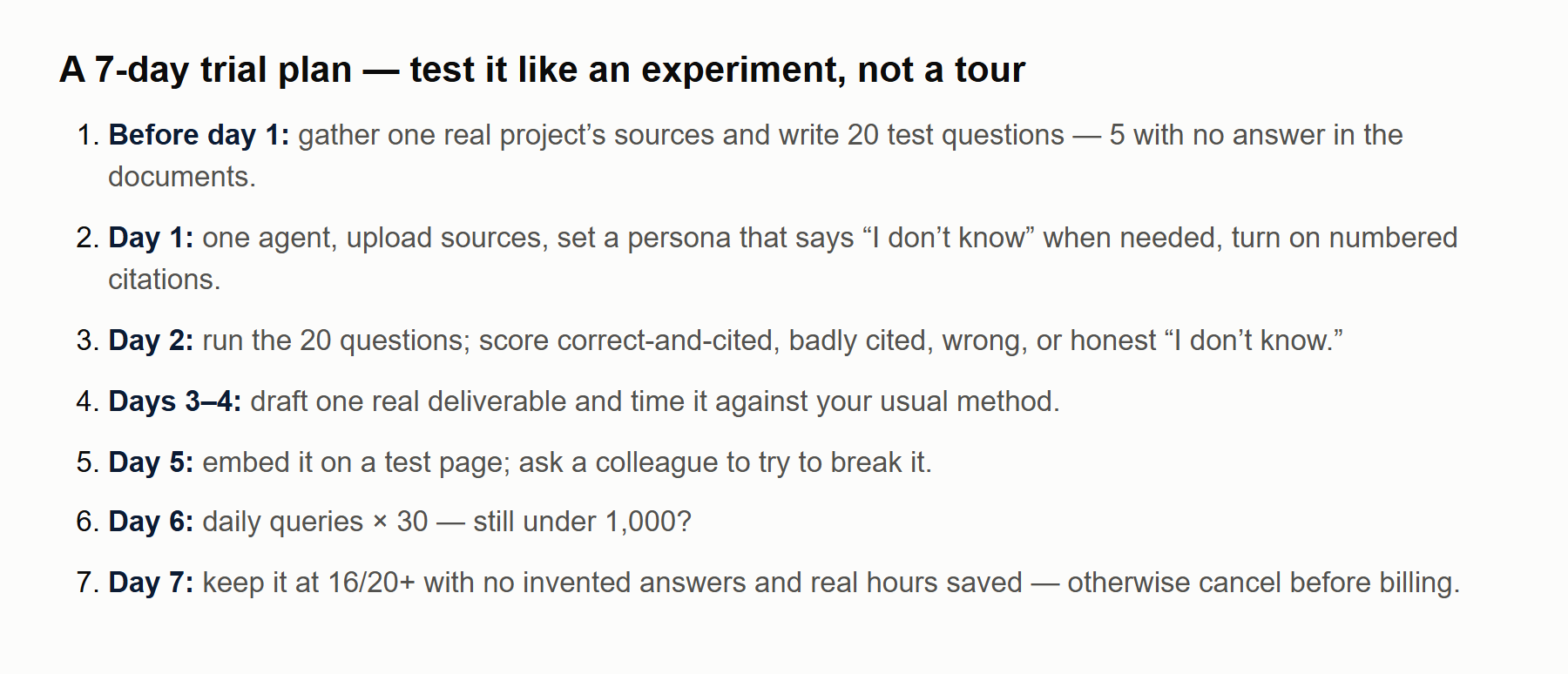
Before day 1: gather one real writing project's sources (50–500 documents), and write 20 test questions whose answers you already know — including 5 whose answers are not in the documents.
Day 1: create one agent, upload the sources, set a persona (tone, audience, "say I don't know if it isn't in the sources"), and turn on numbered citations.
Day 2: run your 20 questions. Score each one: correct and cited, correct but badly cited, wrong, or correctly said "I don't know." The five trick questions are the most important — they show whether it invents.
Days 3–4: draft one real deliverable — a study guide, a proposal section, a policy — and time yourself against how long it usually takes.
Day 5: if the agent will be public, embed it on a test page and ask a colleague to try to break it.
Day 6: check the query counter. Multiply your daily use by 30. Is it under 1,000?
Day 7: decide. Keep it if it scored at least 16/20, never invented an answer to the trick questions, and saved you real hours. Otherwise, cancel from the billing page before the trial ends.
15. The bottom line
CustomGPT.ai is not the best AI writer — general models like ChatGPT and Claude write better prose for a fifth of the price. It is one of the better AI researchers that write: it reads a library you own, answers from it, shows its sources, and admits when something isn't there. The one independent test, though dated, backs that up with a clear margin.
That makes it worth $99 a month for people whose writing lives on top of a large, trusted body of material and who will use most of the 1,000 monthly queries: lecturers, researchers, grant writers, technical writers, compliance and HR teams, consultants, support teams, and agencies that can resell agents. For occasional writing from a few files, keep your money and use NotebookLM or a $20 chatbot.
If you're in the first group, the official CustomGPT.ai site has the current plans and the 7-day trial. Prepare your test questions first — then the seven days will tell you more than any review can.
Sources (all accessed October 29, 2026 unless noted): CustomGPT.ai homepage and pricing page; docs.customgpt.ai (citations, Research Analyst persona, changelog May 20–26, 2026); researcher.customgpt.ai documentation; Tonic.ai, "RAG Evaluation Series: Validating the RAG Performance of OpenAI vs CustomGPT.ai" (Feb 27, 2024); G2, Capterra, Software Advice and Trustpilot listings; OpenAI Help Center, "Knowledge in GPTs"; claude.com/pricing; chatbase.co/pricing; published NotebookLM plan limits (October 2026).
Frequently asked questions
Is CustomGPT.ai the same as OpenAI's custom GPTs?
No. CustomGPT.ai is a separate company and product. It uses large language models from OpenAI and others underneath, but adds its own ingestion, retrieval, citations and deployment (website widget, API, Slack, MCP). OpenAI's custom GPTs live inside ChatGPT and accept up to 20 knowledge files each.
How much does CustomGPT.ai cost?
As of Oct 29, 2026: Standard is $99 a month ($89 billed annually) with 1,000 queries; Premium is $499 a month ($449 annually) with 5,000 queries; Enterprise is custom. Extra queries cost $375 for 2,500 (about $0.15 each).
Is there a free plan?
No. Standard and Premium include a 7-day free trial. A credit card is required, billing starts automatically when the trial ends, and you cancel from the billing page with "Cancel Subscription".
Is CustomGPT.ai good for writing?
It is strong for writing that must be traceable to your own sources — literature briefs, proposals, policies, course materials, help articles and RFP answers — because every answer can cite the passage it came from. For polished or creative prose, general models such as ChatGPT or Claude write better for less money.
Is the "#1 in accuracy" claim true?
The evidence is one independent Tonic.ai test from February 2024: CustomGPT.ai averaged 4.4 out of 5 against 3.5 for OpenAI Assistants on 55 questions, with 6 weak answers versus 21. It is a real margin, but it is one dated test, so run your own questions during the trial.
Who benefits most from CustomGPT.ai?
People who write repeatedly from a large library they own: lecturers, researchers, grant writers, technical writers, compliance and HR teams, consultants, bid managers, support teams, and agencies that resell white-label agents. Students and casual bloggers are usually better served by free or $20 tools.
Is CustomGPT.ai HIPAA compliant?
HIPAA is not mentioned on its pricing page or homepage as of Oct 29, 2026. It states SOC 2 Type 2 and GDPR compliance on all plans. Do not upload patient data unless the company confirms HIPAA terms in writing.
Can I use it for academic writing?
Yes, as a research assistant: finding, sorting and citing passages from sources you are allowed to upload. Follow your journal or university's AI disclosure rules, only cite work you have read yourself, and write the argument in your own voice.
Pay for it when your writing sits on a big library you own — and test it with your own 20 questions first.
Use the 7-day trial like an experiment: real sources, questions you already know the answers to, five with no answer in the documents. Keep it if it never invents and saves you real hours; otherwise cancel before billing starts.
What changed in this update: First published Oct 29, 2026 as a pre-purchase research review. Plans, limits and competitor prices checked Oct 29, 2026.
Get the next review in your inbox
One email a week: one tool checked, one number, one honest verdict.