Which Businesses Should Switch to AI Now — and Which AI Tools Fit Each Department (2026)
Not every business needs AI this year — but some are already losing time and money without it. This guide uses official statistics and peer-reviewed studies to show who is adopting AI, what it measurably changes, the signs your business is ready, and which type of AI tool fits each department, with prices checked on October 19, 2026.
The short answer
Switch now if your business has repetitive, text-heavy work at volume (customer messages, documents, content, reports), a pain you can measure (backlogs, slow replies, data-entry errors), and information already in digital form. Start with one department, one task, and a 30-day pilot. If your records still live on paper or in scattered chats, the first "AI project" is digitizing them.
1. Where AI adoption really stands in 2026
Headlines often claim that "almost every company uses AI." Official statistics, which survey a representative sample of all businesses rather than mostly large ones, tell a more useful story: about one business in five uses AI to produce goods or services.
The gap between 20% and 88% is not a contradiction. McKinsey surveys executives at organizations already investing in technology and counts any regular use in one business function. Statistical offices ask every kind of business — including the corner shop and the five-person accounting firm — whether they use AI in producing goods or services. Even in McKinsey's sample, only about one-third of companies had begun to scale AI beyond pilots, and just 6% qualified as "high performers" attributing 5% or more of EBIT to AI.
Adoption is rising fast. In the EU the share more than doubled in two years, from 8.1% in 2023 to 20.0% in 2025. In the US, 20–23% of businesses expected to be using AI within six months in early 2026.
EU enterprises using AI, by year
Size is the strongest predictor
Large companies adopt AI three times as often as small ones. They have data teams, budgets, and processes that are already digital. Small firms are catching up, but the gap remains large.
EU enterprises using AI in 2025, by size
The US pattern is the same: in the period ending May 3, 2026, about 37% of US businesses with 250 or more employees and 32% of those with 100–249 employees used AI, while fewer than 20% of firms with four or fewer employees did.
Some industries are far ahead
US businesses using AI by sector (as of May 3, 2026)
In the EU, information and communication (62.5%) and professional, scientific and technical services (40.4%) lead as well. These sectors share three traits that matter for every business deciding whether to switch: their product is information, their work is mostly text and numbers, and their data is already digital.
What are firms using AI for? Among EU enterprises that use AI, the most common purposes in 2025 were marketing or sales (34.7%) and business administration or management (31.1%). The most used technology was text analysis (11.8% of all enterprises), followed by generating images, video, or audio (9.5%) and generating written or spoken language (8.8%).
2. What AI measurably changes — the evidence
Vendor case studies promise dramatic savings. Peer-reviewed research is more modest, and more useful, because it shows which tasks and which workers benefit.
Lesson 1: The biggest gains go to newer and less experienced staff
In the customer-support study, less experienced and lower-skilled agents improved in both speed and quality, while the most experienced agents saw small speed gains and small declines in quality. AI spreads the know-how of your best people to everyone else. That is valuable for businesses with high staff turnover or many new hires, and a warning not to let AI overrule your experts.
Lesson 2: AI works on tasks, not on whole jobs
Eloundou and colleagues, writing in Science, assessed AI exposure task by task rather than job by job. Most jobs contain some tasks that AI handles well (drafting, summarizing, classifying, extracting) and many it does not (negotiating, physical work, judgment calls with incomplete information). The right question is not "Can AI do this job?" but "Which tasks in this department are repetitive, language-based, and checkable?"
Lesson 3: Customer and employee experience can improve too
The same customer-support study found that customers were more polite and less likely to ask for a manager when agents had AI assistance. The writing experiment found that people exposed to ChatGPT were twice as likely to use it in their real job two weeks later. Once people see a tool save them time on a task they dislike, adoption tends to spread on its own.
What the evidence does not show
None of these studies show that AI replaces whole teams, or that gains appear without a human checking the output. Every gain above was measured with people still in the loop. Plan for AI that makes your people faster, not for AI that removes them.
3. Seven signs your business is ready — and should switch
Readiness research (Jöhnk, Weißert and Wyrtki, Business & Information Systems Engineering, 2021) groups the factors into strategy, resources, knowledge, culture, and data. In practice, these become seven observable signs. If four or more apply to you, waiting costs more than starting.
- The same questions arrive every day. Price, stock, opening hours, order status, delivery times — answered by hand, again and again.
- Someone retypes documents. Invoices, receipts, delivery notes, or forms are copied from paper or PDF into a spreadsheet or system.
- Content is always late. Social posts, product descriptions, proposals, and reports pile up because they take hours to write.
- Customers wait for replies. Messages sit unanswered after hours or during peaks, and you lose sales to faster competitors.
- Your data is already digital. Sales, stock, and customer records live in a system or at least in organized spreadsheets, not on paper.
- People already use ChatGPT on their own. Staff are experimenting without rules — a sign of demand, and of risk if customer data is pasted into personal accounts.
- Leadership can name one measurable pain. "Replies take 6 hours," "month-end closing takes 5 days." A measurable pain is what makes a pilot provable.
4. Which types of business should move first
The businesses that benefit first are not necessarily tech companies. They are businesses where many small, repeated, language-heavy tasks pile up. The table summarizes where each type typically gets its first win.
| Type of business | Why AI fits now | Best first task |
|---|---|---|
| Online shops & retail | High message volume; hundreds of product listings | WhatsApp/chat answers for FAQs; product descriptions |
| Professional services (accounting, legal, consulting) | Work is documents and text; billable time is precious | Document extraction and first drafts of reports and letters |
| Finance, insurance, lending | Already digital; rule-heavy forms | Claims and application triage; customer-service assistant |
| Education & training | Materials, quizzes, and feedback at scale | Drafting modules and question banks; answering student FAQs |
| Clinics & healthcare admin | Booking and administrative questions repeat daily | Appointment and FAQ assistant; summarizing notes (with strict privacy rules) |
| Distribution & logistics | Orders, delivery notes, and stock data at volume | Order intake from chat; demand forecasting from sales history |
| Food & beverage, hospitality | Reviews, reservations, social content | Review replies and social posts; reservation questions |
| Manufacturing | SOPs, quality records, maintenance logs | SOP drafting and training; visual inspection later (needs data) |
Notice the pattern: in almost every case, the first win is a communication or document task, not a futuristic one. Forecasting, computer vision, and predictive maintenance pay off too, but they need clean historical data and usually a technical partner, so they come second.
5. When not to switch yet
Some businesses should hold off — or rather, do something else first. Use this quick check.
Two more red flags: if your team is in the middle of another major change (a new ERP, a merger, a reorganization), wait for it to settle. And if leaders expect AI to cut headcount immediately, reset that expectation — the evidence in section 2 shows gains in speed and quality with people still in the loop.
6. Which AI fits each department
"AI" is not one product. There are five families of tools, and each department needs a different mix:
- General AI assistants (ChatGPT, Claude, Gemini, Microsoft 365 Copilot) — drafting, summarizing, analyzing documents and spreadsheets.
- AI agents built into business software — customer-service bots, CRM assistants, accounting tools that read receipts.
- Automation platforms (Zapier, Make, n8n) — connecting apps so that AI steps run automatically.
- Creative AI — images, video, and voice for marketing.
- Predictive and vision AI — forecasting, anomaly detection, quality inspection; these need clean historical data.
| Department | Tasks AI handles well today | Type of AI that fits |
|---|---|---|
| Customer service | FAQ answers, routing messages, drafting replies, summarizing chats | AI agent in your helpdesk or WhatsApp tool; general assistant for drafts |
| Sales & marketing | Posts and ad copy, product descriptions, proposals, competitor research | General assistant with brand-voice instructions; creative AI for visuals |
| Finance & accounting | Extracting invoice and receipt data, reconciliation suggestions, report narratives, payment reminders | Accounting software with document AI; automation for reminders |
| Human resources | Job descriptions, CV summaries, policy Q&A, training materials | General assistant; internal chatbot over the handbook |
| Operations | SOPs, daily report summaries; later scheduling and quality inspection | General assistant now; predictive/vision AI once data exists |
| Procurement & inventory | Comparing supplier quotes, reading delivery notes, demand forecasts | Document AI; forecasting from sales history |
| IT & data | Helpdesk answers, code and scripts, data cleaning | AI coding assistant; helpdesk agent |
| Admin, legal & compliance | Letters and minutes, contract clause review, translation, document search | General assistant with business data protections; searchable document archive |
| Management | Weekly briefs from unit reports, plans and slides, scenario explanations | General assistant connected to your files; dashboard with alerts |
Choosing a general AI assistant
For most small and mid-sized businesses, a business plan of one general assistant covers 60–80% of the first-year use cases. Choose the one that fits the software you already use: Microsoft 365 Copilot if your team lives in Word, Excel, and Outlook; Gemini if you run on Google Workspace; ChatGPT or Claude if you want a standalone assistant that works across tools. Whatever you choose, use a business or team plan rather than personal accounts, so company data is handled under business terms and access can be managed centrally.
7. What it costs to start
Prices below were checked on October 19, 2026. "Vendor" means the price was read on the vendor's pricing page; "reported" means the vendor page could not be read automatically and the price comes from several dated third-party price checks. Confirm on the vendor's site before buying.
| Tool | Plan | Price | Checked |
|---|---|---|---|
| Claude | Pro (individual) | $20/month, or $17/month billed annually | Vendor |
| Claude | Team, Standard seat | $25/seat/month, or $20 billed annually | Vendor |
| ChatGPT | Plus (individual) | $20/month | Reported |
| ChatGPT | Business | $25/user/month, or $20 billed annually (2-user minimum) | Reported |
| Microsoft 365 Copilot | Business (up to 300 users) | $21/user/month annual list price; $18 promotional price through Dec 31, 2026; requires a Microsoft 365 license | Reported |
| Intercom | Fin AI agent | $0.99 per resolved outcome, plus helpdesk seats from $29/seat/month | Vendor |
| Zapier | Professional | $19.99/month billed annually ($29.99 monthly), 750 tasks/month | Vendor |
A worked example
A 5-person team buys a general assistant at $25 per seat per month and one automation plan at about $20 per month: $145 per month. If the writing evidence holds for the drafting part of their work — 40% less time — and each person spends 5 hours a week drafting emails, posts, and reports, the team saves about 2 hours per person per week, or roughly 43 hours a month. At a loaded cost of $20 an hour, that is about $860 of time each month, around six times the subscription cost. Your own numbers will differ. That is exactly why section 9 starts by measuring the task before the pilot.
Want to add up an existing AI and software stack? Our AI Tool Cost Calculator totals subscriptions per year and flags overlaps.
8. The three real barriers and how to remove them
When EU enterprises that had considered AI were asked why they did not use it, three answers dominated. None of them is about the technology being too weak.
Why EU enterprises that considered AI did not use it (2025)
Barrier 1 — Expertise (70.9%)
You do not need a data scientist to start. You need two or three people who are trained on your chosen assistant with your own tasks. A two-hour hands-on session using real company documents works far better than a generic course. Appoint one "AI champion" per department to collect prompts that work and share them.
Barrier 2 — Legal uncertainty (52.5%)
Write a one-page AI use policy: which tools are approved, what data may never be entered (customer IDs, health data, salaries, unreleased financials, contracts under NDA), that every AI output used externally is checked by a person, and who to ask when unsure. In regulated sectors such as health and finance, have your legal adviser review it once.
Barrier 3 — Privacy (48.8%)
Use business plans with admin controls, turn off training on your data where the vendor offers that setting, and keep sensitive work inside systems you already trust. For customer-facing bots, publish what the bot does and offer a path to a human.
9. A 90-day adoption plan
| Days | What to do | Output |
|---|---|---|
| 1–7 | Map departments (use the AI Adoption Map), pick one Start now task, and measure how long it takes and how often it fails today. | Baseline numbers |
| 8–14 | Write the one-page AI policy; buy one business AI plan for the pilot team; run a 2-hour training on the chosen task. | Policy + trained team |
| 15–45 | Run the pilot with a human check on every output. Collect the prompts that work in a shared document. | Prompt library + pilot data |
| 46–60 | Compare against the baseline: time, errors, customer response. Decide to scale, fix, or drop. | Go / no-go decision |
| 61–90 | Scale the winner to the whole department; start the second task, ideally in a different department. Add automation (Zapier/Make) once the manual AI step is stable. | Second pilot + first automation |
The order matters. Automating a process before people trust the AI step usually automates mistakes. Manual first, then automatic.
10. Map your own company in 5 minutes
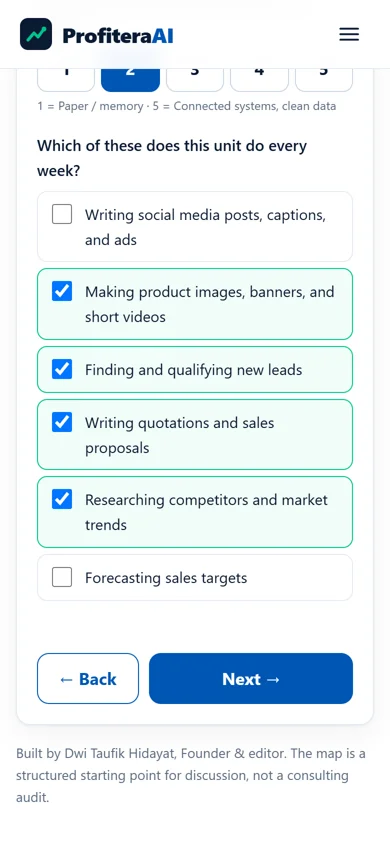
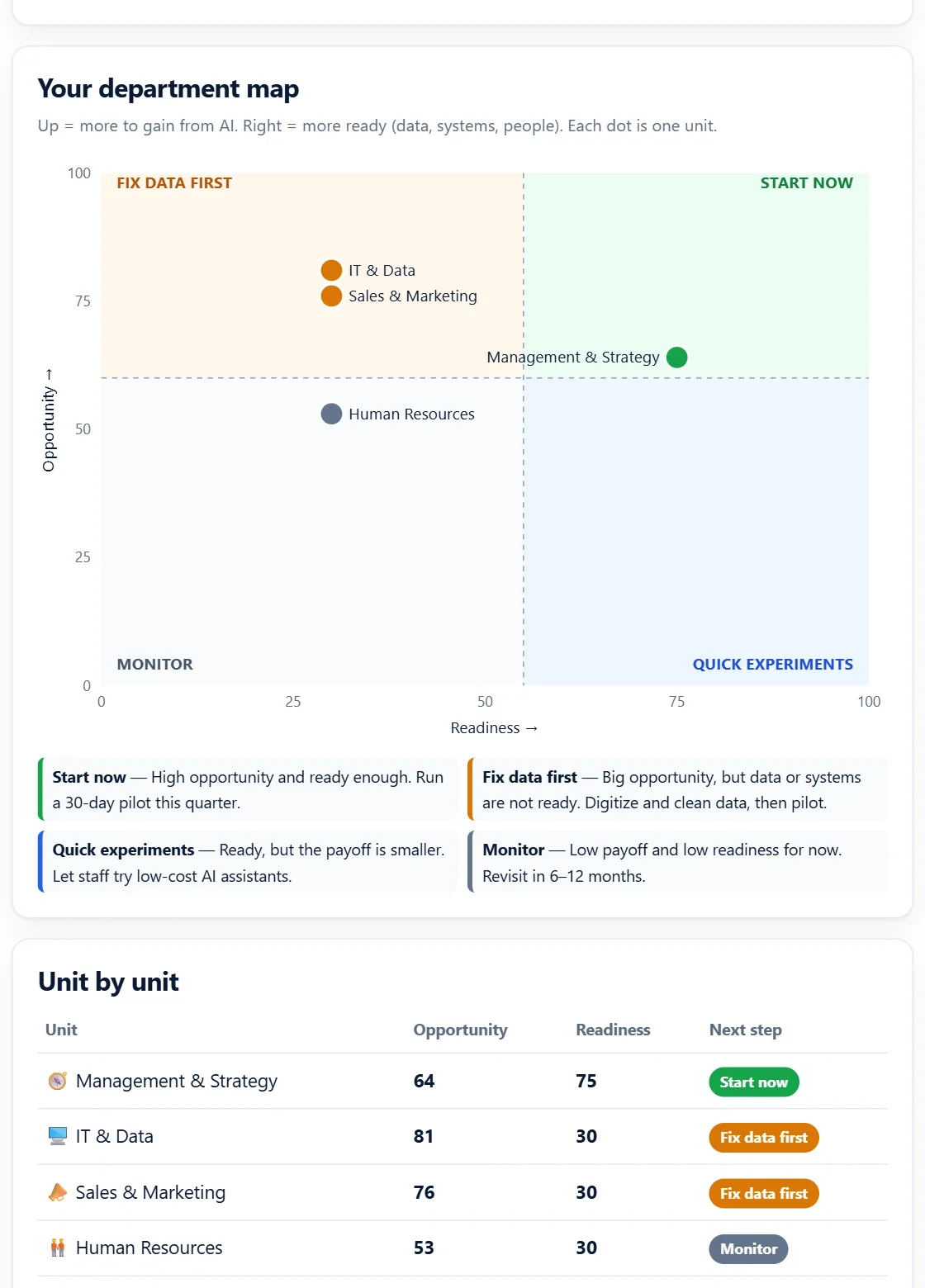
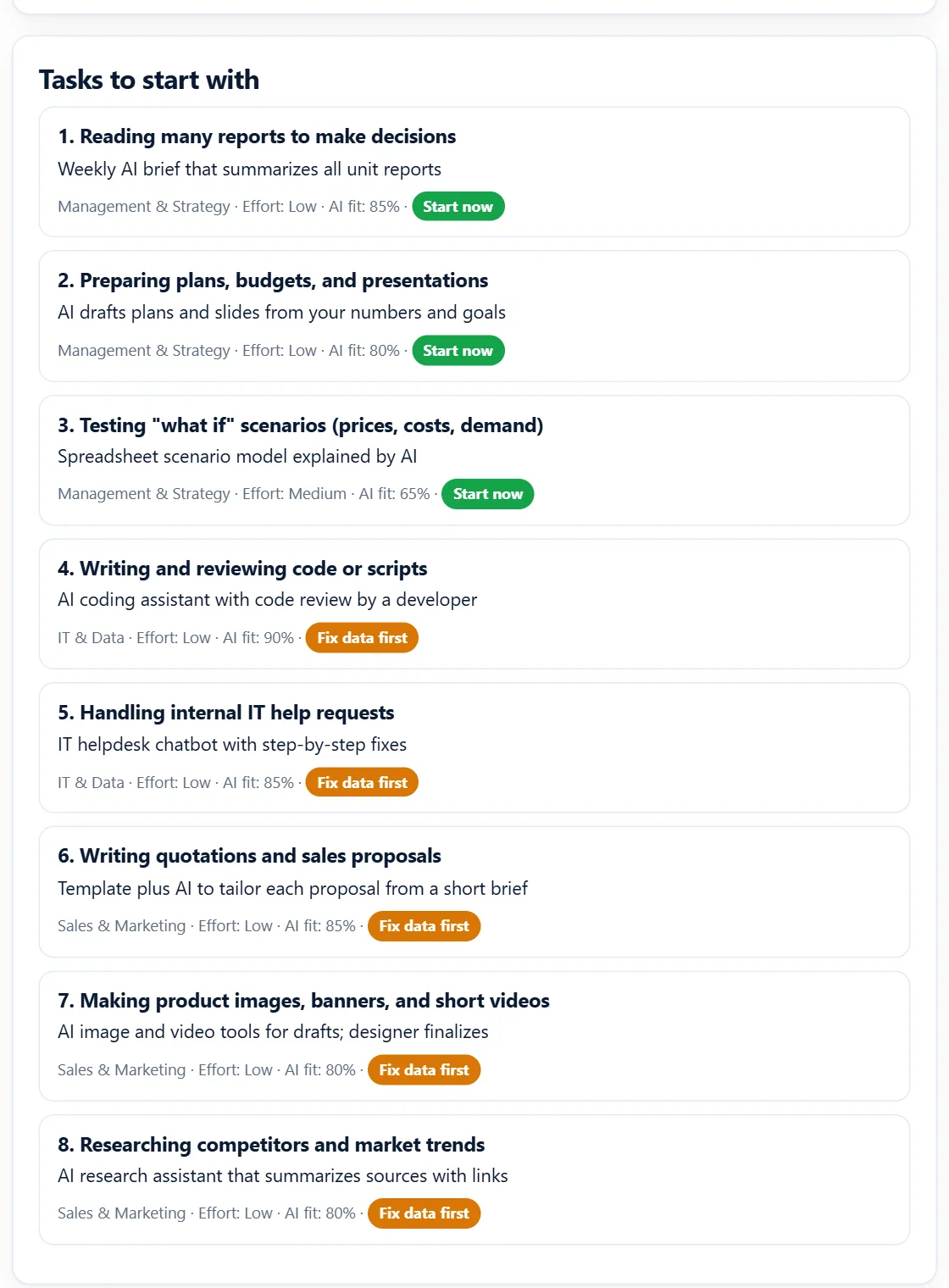
The free AI Adoption Map applies the logic of this guide to your company. You choose the departments you know, answer four questions for each (how repetitive, how text-heavy, how painful, how digital), tick the tasks they do every week, and rate six organization-wide readiness factors.
You get an AI Adoption Index from 0 to 100, a chart placing every department in one of four quadrants (Start now, Fix data first, Quick experiments, Monitor), a ranked list of tasks with the type of AI that fits each one, and a 30-day pilot plan. The result is also emailed to you.
Start the AI Adoption Map →
11. Frequently asked questions
How many businesses actually use AI in 2026?
Official statistics put it at about one in five. The US Census Bureau measured 19.8% of US businesses using AI as of May 3, 2026, and Eurostat measured 20.0% of EU enterprises with 10 or more employees in 2025. Consultancy surveys of larger companies report much higher figures, such as McKinsey's 88%, because they sample bigger firms and count any regular use in one function.
Is my business too small to use AI?
No, but small firms adopt less: 17% of small EU enterprises (10–49 people) used AI in 2025 versus 55% of large ones. Small teams usually get the fastest payoff from general AI assistants for writing, customer replies, and document work, which cost about $20–25 per person per month.
Which department should start with AI first?
Usually the one with high-volume, text-heavy, repetitive work and a measurable pain: customer service, marketing content, finance document entry, or HR policy questions. Use the free AI Adoption Map to score your own departments.
Does AI really improve productivity?
In controlled studies, yes, for the right tasks. AI assistance raised customer-support productivity by 15% on average (Quarterly Journal of Economics, 5,172 agents) and cut professional writing time by 40% while raising quality by 18% (Science, 453 professionals). Gains were largest for less experienced workers and smallest for experts.
What stops companies from adopting AI?
In the EU, firms that considered AI but did not use it cited lack of relevant expertise (70.9%), unclear legal consequences (52.5%), and data protection and privacy concerns (48.8%). Training, a short AI use policy, and choosing business plans that do not train on your data address most of these.
How much does it cost to start?
A realistic first pilot for a 5-person team is a business AI assistant at about $20–25 per seat per month plus, if needed, an automation tool from about $20 per month. Customer-service AI agents are often priced per resolution, for example $0.99 per outcome for Intercom Fin.
12. Sources
- US Census Bureau — "Large Firms With at Least 20 Employees Biggest AI Users", May 26, 2026 (Business Trends and Outlook Survey, data Dec 14, 2025 – May 3, 2026).
- Eurostat — "20% of EU enterprises use AI technologies", December 11, 2025; and "Use of artificial intelligence in enterprises", Statistics Explained.
- McKinsey & Company — "The state of AI in 2025: Agents, innovation, and transformation", November 2025.
- E. Brynjolfsson, D. Li, L. Raymond, "Generative AI at Work," The Quarterly Journal of Economics (2025), https://doi.org/10.1093/qje/qjae044.
- S. Noy, W. Zhang, "Experimental evidence on the productivity effects of generative artificial intelligence," Science 381 (2023), https://doi.org/10.1126/science.adh2586.
- T. Eloundou, S. Manning, P. Mishkin, D. Rock, "GPTs are GPTs: Labor market impact potential of LLMs," Science 384 (2024) 1306–1308, https://doi.org/10.1126/science.adj0998.
- J. Jöhnk, M. Weißert, K. Wyrtki, "Ready or Not, AI Comes — An Interview Study of Organizational AI Readiness Factors," Business & Information Systems Engineering 63 (2021) 5–20, https://doi.org/10.1007/s12599-020-00676-7.
- Pricing pages: Claude, Intercom, Zapier (read on October 19, 2026); ChatGPT and Microsoft 365 Copilot (reported prices, confirm on the vendor page).
What changed in this update: First published Oct 19, 2026. Statistics and prices checked October 19, 2026. This guide contains no affiliate links.
Get the next guide in your inbox
One email a week: one price change, one tool, one number.