Debt Payoff Planner: honest review & user guide
By Dwi Taufik Hidayat · October 21, 2026 · We make this product — see the disclosure on page 2.
- Cover
- Verdict
- Two methods
- Research
- What's inside
- Step 1: My Debts
- Step 2: Dashboard
- Step 3: Payment Plan
- Extra payment effect
- Tracker
- 30-day workbook
- How the math works
- Limits
- Compared
- FAQ
Debt Payoff Planner
An honest review and a step-by-step guide: snowball vs avalanche with your own numbers, a month-by-month payment plan, and a 30-day workbook to make it stick.
- Spreadsheet for Excel and Google Sheets · up to 10 debts · 30 years
- Every number in this review comes from the real file
- 36-page printable workbook included
The verdict in one page
What it is: a spreadsheet where you type your debts once and get your debt-free date with both popular payoff methods side by side, the payoff month of every debt, total interest, and an exact payment for each debt in each month. A printable 30-day workbook walks you through the decisions that change those numbers.
What works well
- Both methods with the same monthly payment, so the comparison is fair.
- Automatic rollover: when a debt is gone, its payment moves to the next target.
- Warns when a minimum does not cover the interest.
- No account, no app, no data leaves your computer.
- The workbook turns the plan into 30 short daily actions.
Limits to know
- Monthly interest (APR ÷ 12), so results differ slightly from statements that charge daily interest.
- Minimums are fixed; real card minimums often fall as balances fall.
- No automatic bank sync — you update balances yourself every few months.
- Up to 10 debts and 30 years.
- Not a substitute for advice if you cannot make minimum payments.
Best for: anyone with two or more debts who wants a date, a plan and an honest comparison of the two methods. Not for: a single loan (your lender's schedule is enough) or a debt crisis — call your lenders or a nonprofit credit counselor first.
Snowball vs avalanche, explained
Both methods follow the same three rules: pay every minimum, put all extra money on one target debt, and when the target is paid off, roll its whole payment onto the next target. The total you pay each month stays the same until you are debt-free — that is what makes the plan accelerate.
| Snowball | Avalanche | |
|---|---|---|
| Target first | Smallest balance | Highest APR |
| Strength | Quick, visible wins | Lowest total interest |
| Risk | Pays more interest | First win can take longer |
| Best if | You need motivation to keep going | You are disciplined and the APR gap is big |
With the built-in example
Four debts — a $900 store card at 29.99%, a $4,200 credit card at 24.99%, a $3,000 personal loan at 11.5% and an $11,500 car loan at 6.9% — with $570 in minimums plus $200 extra, $770 a month:
| Debt | Paid off — snowball | Paid off — avalanche |
|---|---|---|
| Store card | Month 5 | Month 5 |
| Credit card | Month 22 | Month 19 |
| Personal loan | Month 12 | Month 21 |
| Car loan | Month 30 | Month 30 |
| Total interest | $2,988.74 | $2,731.81 |
Avalanche saves $256.93 and finishes in the same month; snowball gets its second win nine months earlier. The planner shows you this trade-off for your own debts.
What the research says
The "math versus motivation" debate is not just opinion. Two peer-reviewed studies in the Journal of Marketing Research are worth knowing:
What that means for you
- If you have tried and stalled before, early wins may be worth a little extra interest — snowball.
- If the avalanche saving is large in your numbers, it is usually worth the wait.
- Either way, the planner lets you see the real cost of the choice before you make it.
Sources
- Gal, D. and McShane, B.B. (2012) 'Can small victories help win the war? Evidence from consumer debt management', Journal of Marketing Research, 49(4), pp. 487–501. doi:10.1509/jmr.11.0272.
- Brown, A.L. and Lahey, J.N. (2015) 'Small victories: creating intrinsic motivation in task completion and debt repayment', Journal of Marketing Research, 52(6), pp. 768–783. doi:10.1509/jmr.14.0281.
What's inside
| Tab / file | What it does | You type? |
|---|---|---|
| Start Here | Five-minute instructions and how to open the file in Google Sheets. | No |
| My Debts | Your debts, extra payment, start month and chosen strategy. | Yes — the only tab |
| Dashboard | Debt-free date, months, total interest and payments for both methods; payoff month of each debt; chart. | No |
| Payment Plan | Exactly what to pay on each debt every month for your chosen strategy, with balance left. | No |
| Tracker | Log what you actually paid each month against the plan. | Yes |
| Snowball / Avalanche calc | The month-by-month engine (360 months × 10 debts). | No |
| 30-Day Workbook (PDF) | 36 printable pages: one 15-minute task and worksheet per day. | Print & fill |
Compatibility
Works in Excel 2010 or newer (Windows, Mac, web). For Google Sheets, upload the file to Drive and open it with Sheets. It uses only standard functions (SUMPRODUCT, COUNTIF, EDATE, INDEX) and no macros, so there are no security prompts. We tested the calculations in Excel against an independent simulation; the results matched within a cent.
Step 1 — Enter your debts
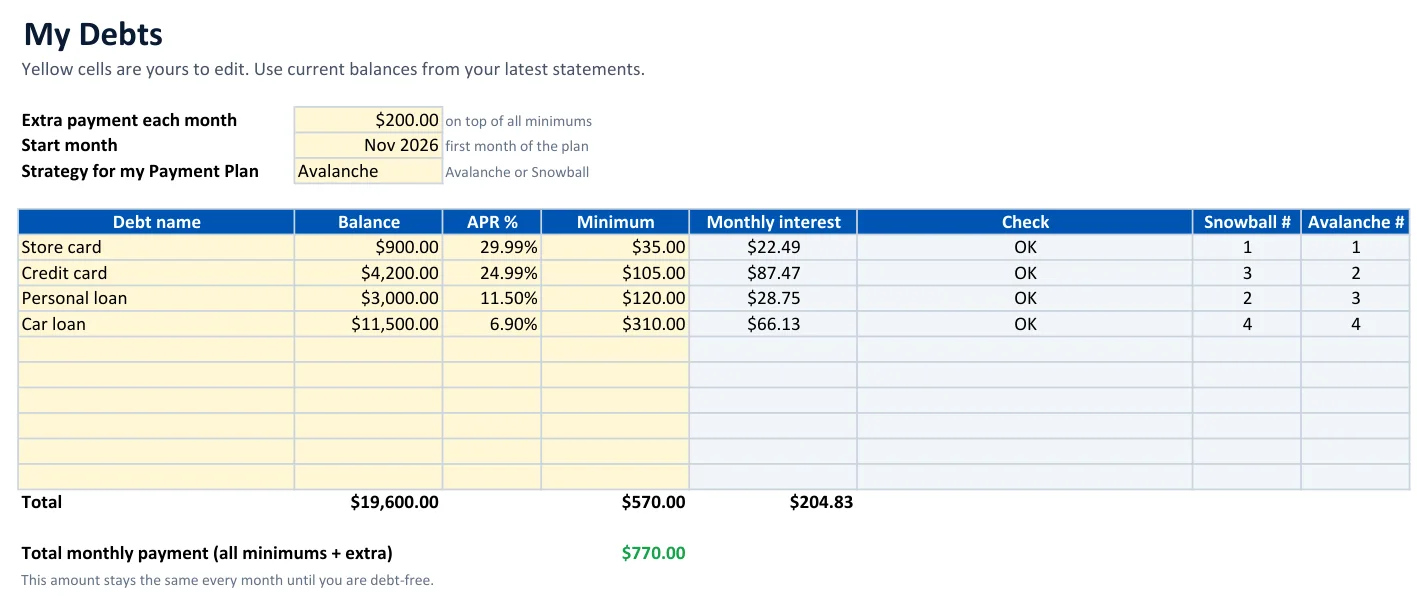
| Field | Where to find it | Tip |
|---|---|---|
| Balance | Your latest statement or app | Use today's balance, not last month's statement balance |
| APR % | Statement box "Interest charge calculation" | Type 24.99, not 0.2499 |
| Minimum | Statement "Minimum payment due" | If it varies, use this month's |
| Extra payment | Your budget | Even $25 changes the date — see page 9 |
| Start month | The month of your next payments | Plans start on the 1st of that month |
The Check column turns red with "Minimum does not cover interest" when a debt would never shrink on its minimum alone — the first problem to fix.
Step 2 — Read the Dashboard
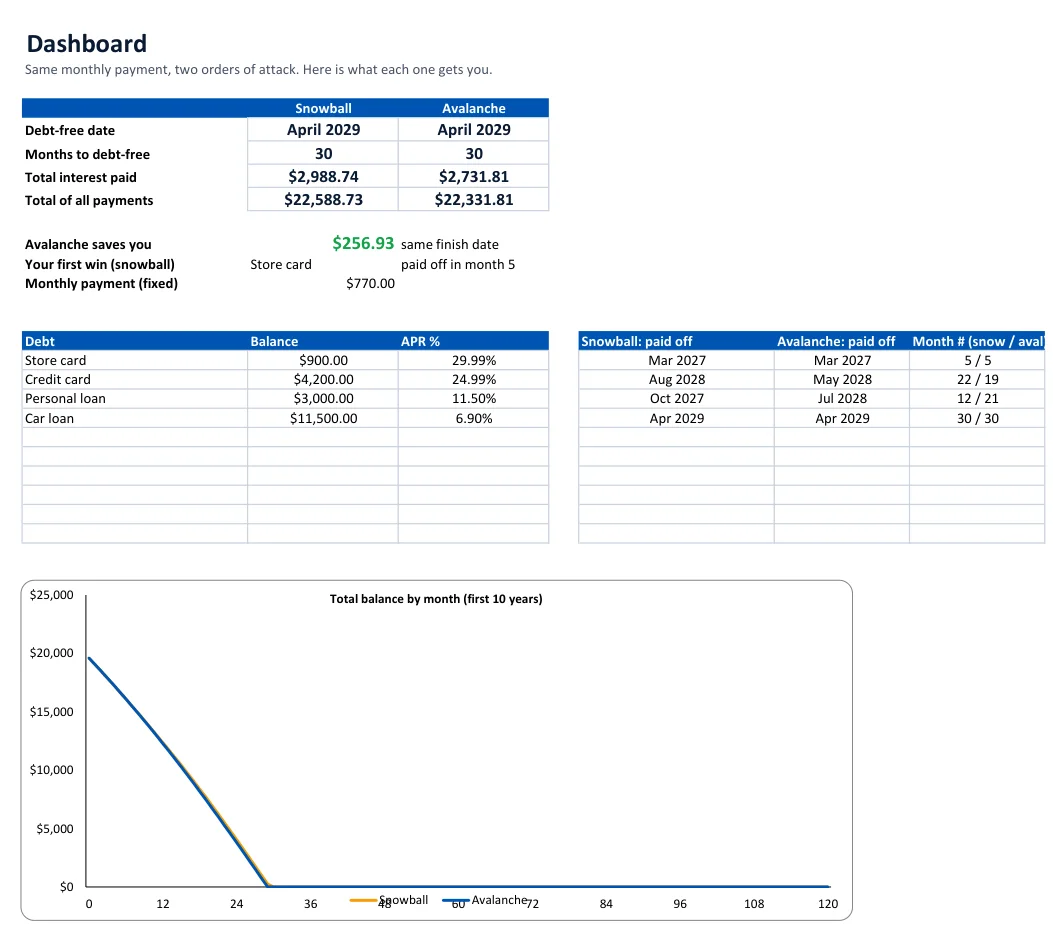
- Debt-free date and months for both methods.
- Avalanche saves you — the interest difference, and whether it finishes sooner.
- Your first win — which debt goes first with snowball, and when.
- Payoff month of every debt for both methods, plus a balance chart for the first ten years.
Step 3 — Follow the Payment Plan
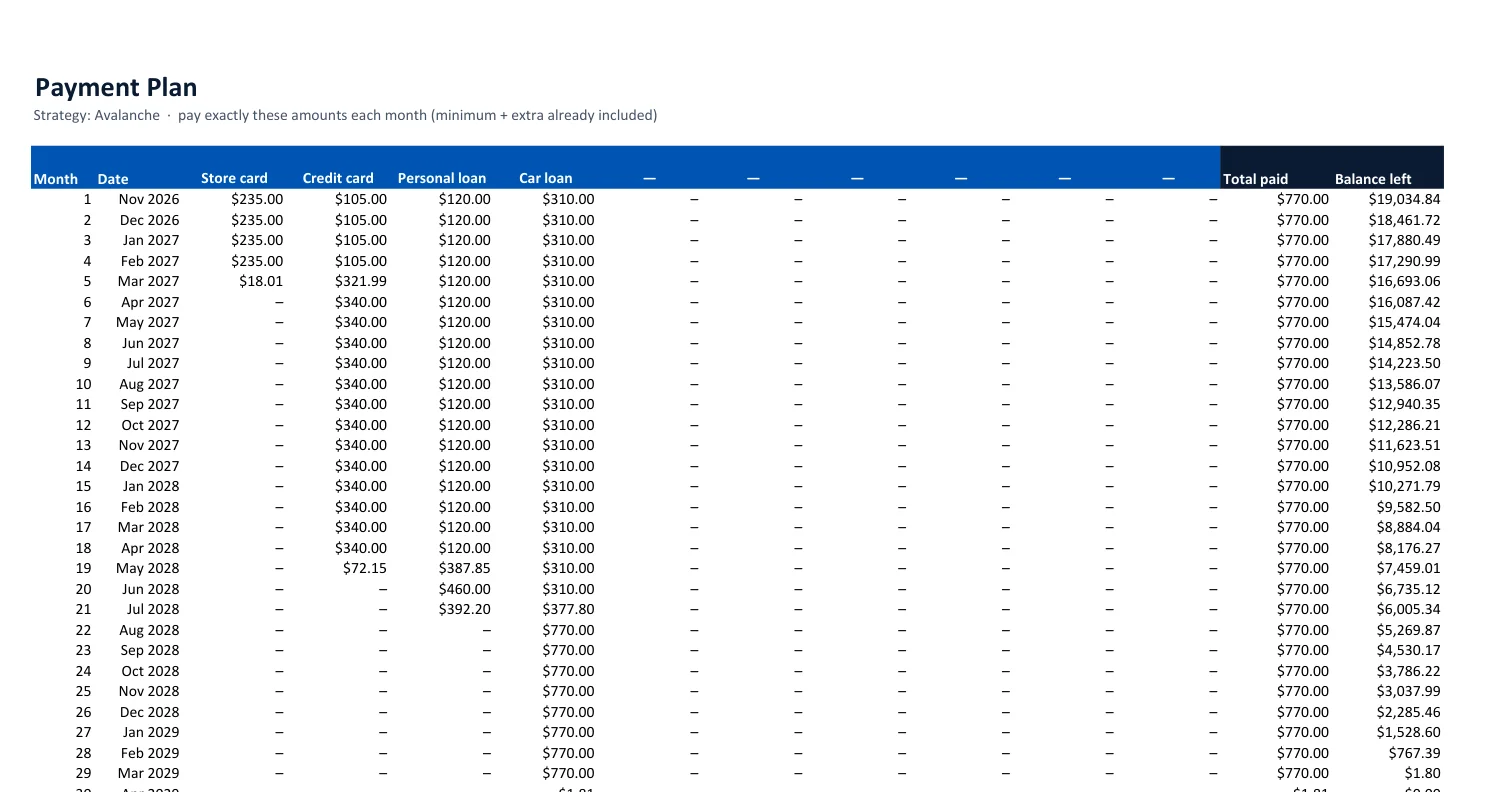
Look at month 5 in the example: the store card takes its last $18.01, and from month 6 the credit card payment jumps from $105 to $340 — its own minimum plus the store card's old payment plus the extra. That is the rollover, done for you every month until the last debt is gone. The total stays $770 every month.
The number that matters most: your extra payment
We ran the built-in example with different extra amounts. The method matters — but the extra payment matters far more:
| Extra / month | Months (both methods) | Interest — snowball | Interest — avalanche | Avalanche saves |
|---|---|---|---|---|
| $0 | 45 | $5,534.67 | $5,534.67 | $0.00 |
| $100 | 35 | $3,773.51 | $3,566.31 | $207.20 |
| $200 | 30 | $2,988.73 | $2,731.81 | $256.92 |
| $400 | 23 | $2,157.31 | $1,947.62 | $209.69 |
With minimums only, both methods are identical in this example: no debt is paid off early enough for a rollover to start. That is why Week 2 of the workbook is all about finding the extra.
Small differences of one cent versus the Dashboard come from rounding in the separate simulation.
Step 4 — Track and review
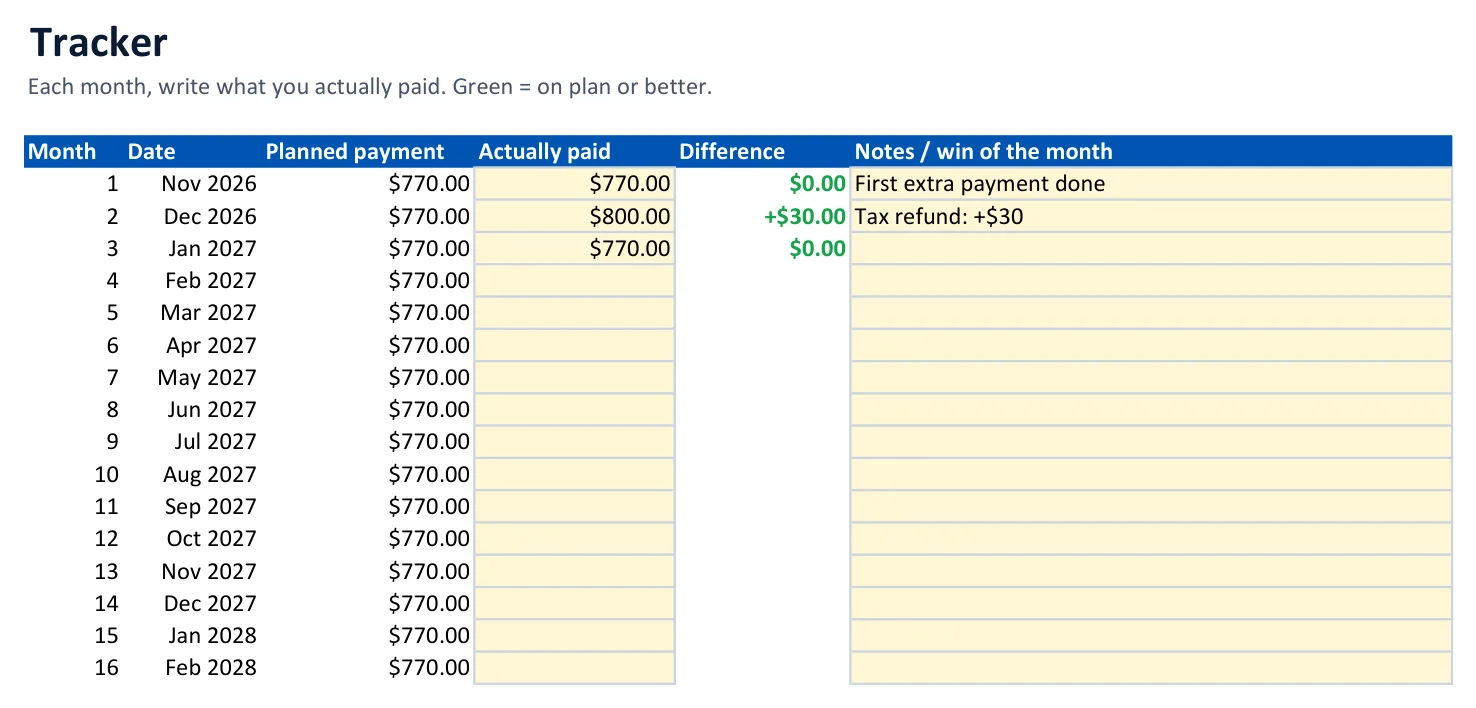
A simple routine
| When | What | Where |
|---|---|---|
| Each payday | Make the payments in this month's row | Payment Plan |
| Each month | Log what you paid and one win | Tracker |
| Every 90 days | Type current balances and APRs; the plan recalculates | My Debts |
| When a debt is paid off | Celebrate (cash only) and check the next target | Dashboard |
The 30-day workbook
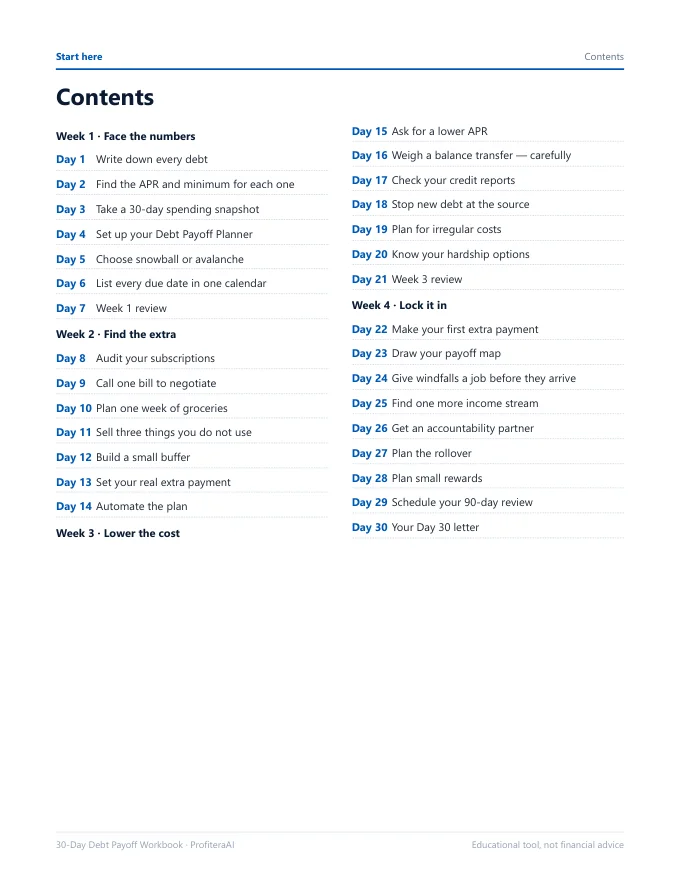
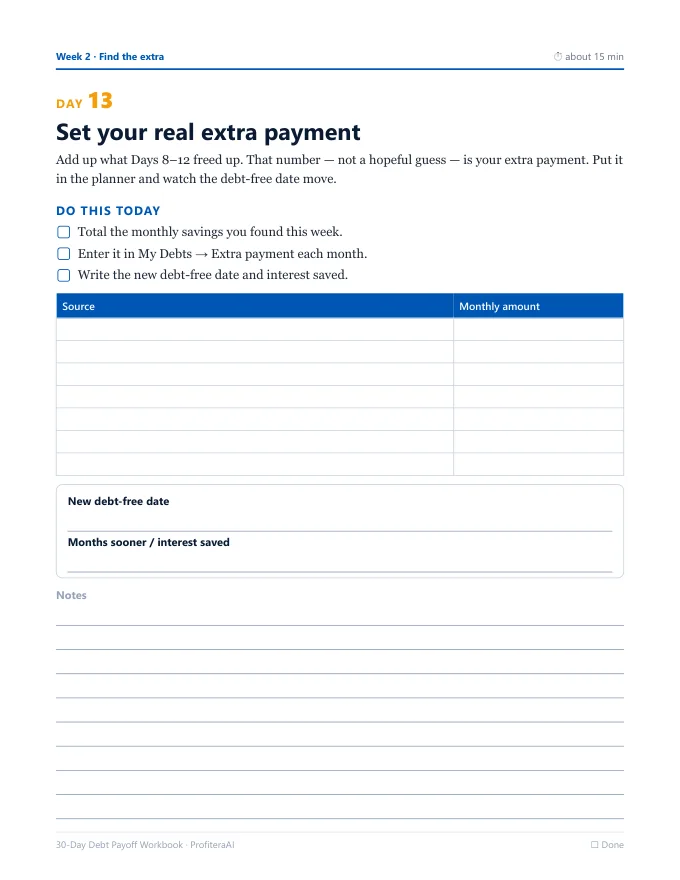
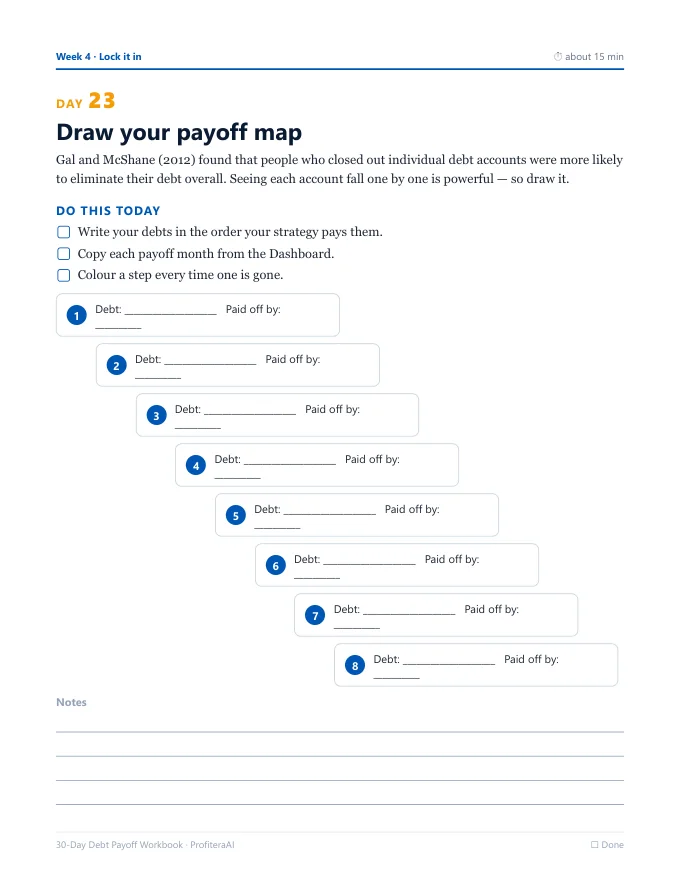
The spreadsheet shows the plan; the workbook helps you do what changes it. Each day is one page with why it matters, a do this today checklist and a worksheet.
| Week | Focus | Examples |
|---|---|---|
| 1 | Face the numbers | List every debt, find APRs, set up the planner, choose a method |
| 2 | Find the extra | Subscriptions, one bill negotiation, groceries, selling unused things, automation |
| 3 | Lower the cost | Ask for a lower APR, weigh balance transfers, check credit reports, stop new debt |
| 4 | Lock it in | First extra payment, payoff map, windfall rule, rollover plan, 90-day reviews |
How the math works
pay minimum on every debt
pool = fixed monthly payment − all minimums
pool goes to the target, then the next target
- Fixed total payment. The sum of all starting minimums plus your extra. It never drops when a debt is paid off — that money rolls over.
- Order. Snowball sorts by smallest balance, avalanche by highest APR; ties keep your row order.
- Interest is charged monthly on the balance at the start of each month.
Why your statement may differ a little
- Many cards charge interest daily on the average balance.
- Fees, new purchases or promotional rates are not included.
- Minimum payments on cards often fall as the balance falls; the planner keeps your minimum fixed, which keeps the plan on schedule.
Limits — and when to use something else
| Situation | Our honest advice |
|---|---|
| One loan only | Use your lender's amortization schedule; you do not need this. |
| More than 10 debts | Combine small same-APR debts into one row, or use a tool built for larger portfolios. |
| 0% promotional balance | Enter 0 APR and set a reminder for the promo end date; update the APR then. |
| Variable-rate loans | Update the APR whenever your rate changes. |
| Cannot pay the minimums | Call your lenders about hardship programs and contact a nonprofit credit counselor before anything else. |
| Want automatic bank sync | Budget apps can sync accounts; this planner is deliberately offline and private. |
The planner is an educational tool, not financial advice. It does not recommend loans, balance transfers or settlements; it shows the arithmetic so you can decide.
How it compares
| Debt Payoff Planner | Typical free calculator | Typical budgeting app | |
|---|---|---|---|
| Snowball and avalanche side by side | Yes, same payment | Often one at a time | Varies |
| Month-by-month plan per debt | Yes, 360 months | Sometimes | Varies |
| Payoff month of every debt | Yes, both methods | Rarely | Varies |
| Works offline, no account | Yes | Online | Account required |
| Your data stays with you | Yes | Varies | Stored by the app |
| 30-day action workbook | Yes (36 pages) | No | No |
| Automatic bank sync | No | No | Often yes |
| Price | $17 once | Free | Often a monthly fee |
If a free calculator answers your question, use it. The planner is for people who want the full plan, both methods with their own numbers, and a structured month to act on it.
FAQ
Does it really work in Google Sheets?
Yes — upload to Drive and open with Sheets. Only standard functions are used.
Which method should I pick?
Look at "Avalanche saves you" on the Dashboard. A small number → snowball for motivation; a large one → avalanche. Page 4 explains why both are reasonable.
Can couples use one file?
Yes. Share it in Google Sheets and list both people's debts.
What if I miss a month?
Type your current balances in My Debts; the plan restarts from today.
How do I get the files?
A download button appears right after PayPal payment, and the link is emailed to you.
Refunds?
14-day money-back guarantee — just email us.