Rewrite Publisher for WordPress: honest review & setup guide
By Dwi Taufik Hidayat · October 20, 2026 · Also included as a PDF with the plugin.
- Cover
- Verdict
- How it works
- Requirements
- Install
- AI keys
- Settings: sources
- Settings: output
- Preview sources
- First article
- The result
- Automation
- Troubleshooting
- Responsible use
- FAQ & support
Rewrite Publisher
for WordPress
An honest review and a step-by-step setup guide: from reference websites and topics to one original, fully written article per topic per day.
- Tested on WordPress 7.1.3 · PHP 8.0 · plugin version 1.2.0
- Real screenshots and real logs — nothing staged
- Works with free Gemini, Groq, Cerebras or Z.AI keys
The verdict in one page
What it is. Rewrite Publisher reads the websites you trust, finds recent articles that match your topics, and asks an AI model to write one new article per topic that synthesizes what those sources say — in its own structure and words. It then adds a title, category, tags, links and (optionally) images, and saves the post as a draft or publishes it on a daily schedule.
What works well
- Real synthesis: our mortgage article drew on 3 sources (~3,560 words) and came out as a new 997-word piece with 5 sections.
- Fast with free keys: 42 seconds per article on Gemini's free tier.
- Falls back across 4 AI providers and many keys; a missing model never kills a working key.
- Writes tags, links to your older posts, and weaves in the outside links you choose.
- Never reuses a source URL, so daily runs do not repeat themselves.
Limits to know
- Topics must appear in the sources' feeds: "budgeting" found 0 matches on our three finance sites and the run stopped.
- Some publishers block automated reading (HTTP 403); the plugin then only has a headline to work from.
- You need at least one AI key (free tiers are enough to start).
- WP-Cron only runs when your site gets visits — add a real cron job for reliable daily posts.
- AI text still needs a human check before it goes live.
Best for: site owners who already know which sources they trust and want a daily first draft on topics those sources cover. Not for: anyone hoping to publish hundreds of unedited AI posts — that is against Google's spam policies and this guide explains how to avoid it (page 14).
How it works
Each topic goes through the same pipeline once per day (or whenever you click Generate):
Finds each site's RSS/Atom feed; falls back to links on the homepage.
Scores every article title and summary against your topic.
Extracts the readable text of up to 4 unused matches.
AI synthesizes the facts into one original article, not a copy of any single source.
Checks the minimum word count, adds tags, internal and external links, images.
Draft or publish, under a category named after the topic.
What the AI is asked to do
The writing prompt asks for a new structure and angle, plain and specific language, varied sentence length, and no copied sentences. The sources are treated as seeds for facts; the model expands them with general knowledge so the result can stand on its own. If the first draft is shorter than your minimum, the plugin runs one expansion pass.
What it remembers
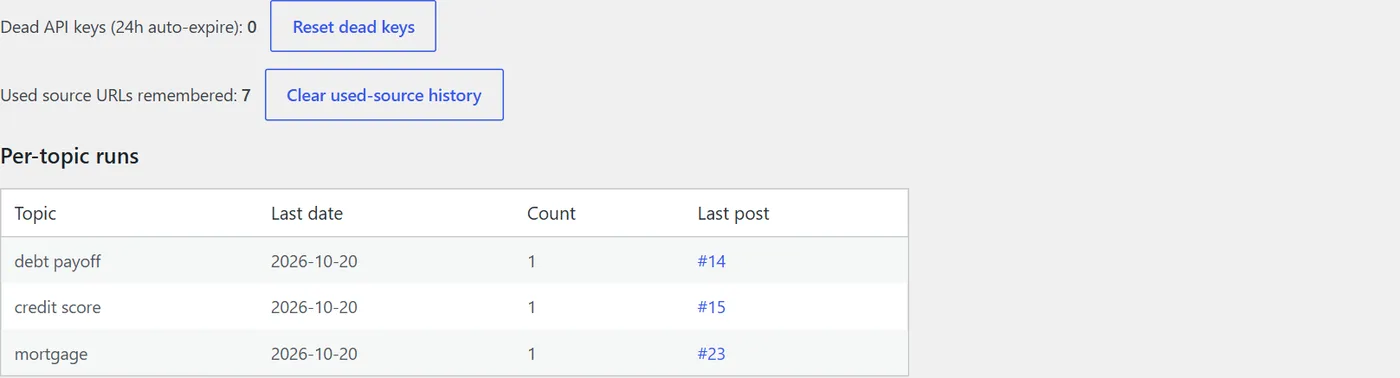
- Used source URLs — never rewritten twice (you can clear the history in the Status tab).
- Daily quota per topic — by default one article per topic per day.
- Key health — keys that hit rate limits are paused for a while and retried automatically.
What you need
| Item | Requirement | Notes |
|---|---|---|
| WordPress | A self-hosted site you can install plugins on | Tested on 7.1.3. WordPress.com free plans cannot install plugins. |
| PHP | 7.2 or newer | Tested on PHP 8.0. |
| Outgoing HTTPS | Your host must allow the site to call other websites | Standard on shared hosting (cPanel, etc.). |
| AI key | At least one: Gemini, Groq, Cerebras or Z.AI | Free tiers work. More providers = fewer failed runs. |
| Pexels key | Optional | Only for featured and in-article photos. |
| Cron job | Recommended | For posts that appear even on days with no visitors (page 12). |
Before you start, decide three things
- Your reference sites. Pick sources you would happily cite: official bodies, respected publishers, industry blogs. Sites with an RSS feed work best.
- Your topics. Specific themes that those sources actually publish about ("mortgage", "credit card", "agentic AI") — not meta words such as "guide" or "review".
- Draft or publish. Start with Save as draft. Switch to publishing only after a week of drafts you were happy to post with light edits.
Step 1 — Install and activate
- Download
jdh-rewrite-publisher.zipfrom your purchase email and extract it. It containsjdh-rewrite-publisher-plugin.zip(the plugin — keep it zipped), this guide, and a shortREADME.txt. - In WordPress go to Plugins → Add New Plugin → Upload Plugin, choose
jdh-rewrite-publisher-plugin.zipfrom the download, then Install Now. - Click Activate. A new menu item JDH Rewrite appears in the admin sidebar.

Uploading by FTP / cPanel instead
Extract the plugin zip and upload the jdh-rewrite-publisher folder to wp-content/plugins/, then activate it on the Plugins screen.
Updating later
Deactivate and delete the old version, then upload the new zip. Your settings, keys, topics and history are stored in the database and are kept.
Step 2 — Get free AI keys
The plugin tries providers in this order: Cerebras → Gemini → Groq → Z.AI, rotating through every key you add. You need only one to start; two providers make daily runs far more reliable.
| Provider | Where to get a key | Key looks like | Good to know |
|---|---|---|---|
| Google Gemini | aistudio.google.com → Get API key | AIza… | Our recommended first key. Fast "flash-lite" models finish long articles in under a minute. |
| Groq | console.groq.com → API Keys | gsk_… | Very fast. Free tier has per-minute token limits per account — keys from the same account share them. |
| Cerebras | cloud.cerebras.ai → API Keys | csk-… | Free credits can run out; the plugin then pauses that key for an hour instead of discarding it. |
| Z.AI (GLM) | z.ai → API Keys | id.secret | Useful as a last fallback. |
| Pexels (images) | pexels.com/api | long string | Optional, free. |
Keep keys safe
- Paste keys only into the plugin's Settings tab (or
wp-config.php, see below). Never into posts, pages or support emails. - To keep keys out of the database entirely, add constants to
wp-config.php:JDH_RW_GEMINI_KEY,JDH_RW_GROQ_KEY,JDH_RW_CEREBRAS_KEY,JDH_RW_ZAI_KEY,JDH_RW_PEXELS_KEY. - If a key leaks, delete it in the provider's console and create a new one.
Step 3 — Sources and topics
Open JDH Rewrite → Settings. The top half decides what gets written:
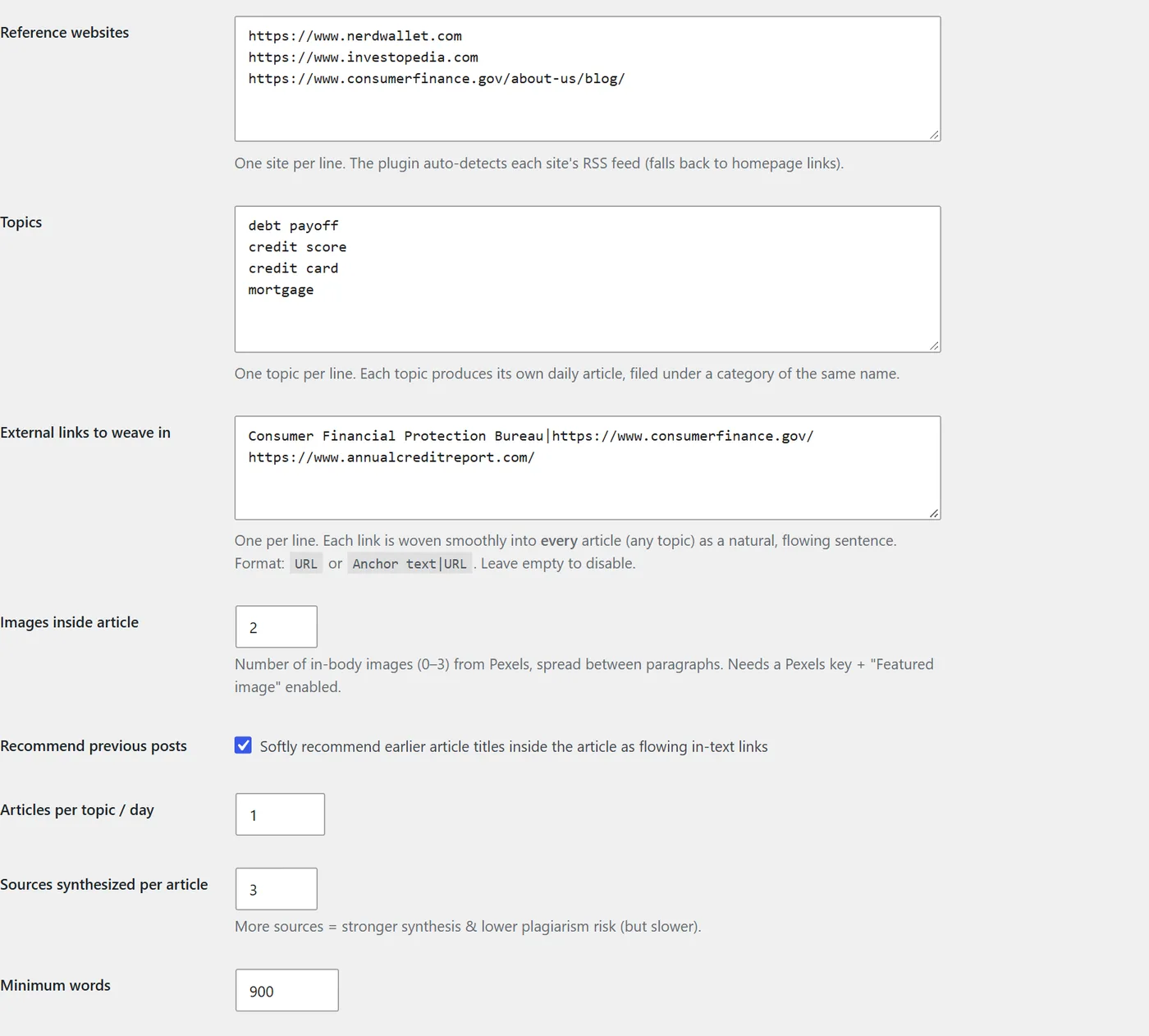
- Reference websites — one per line. A homepage is fine; a section or blog URL is better for big sites.
- Topics — one per line. Each topic becomes its own daily article and its own category.
- External links to weave in —
URLorAnchor text|URL. Added naturally to every article.
Step 4 — Output, images and keys
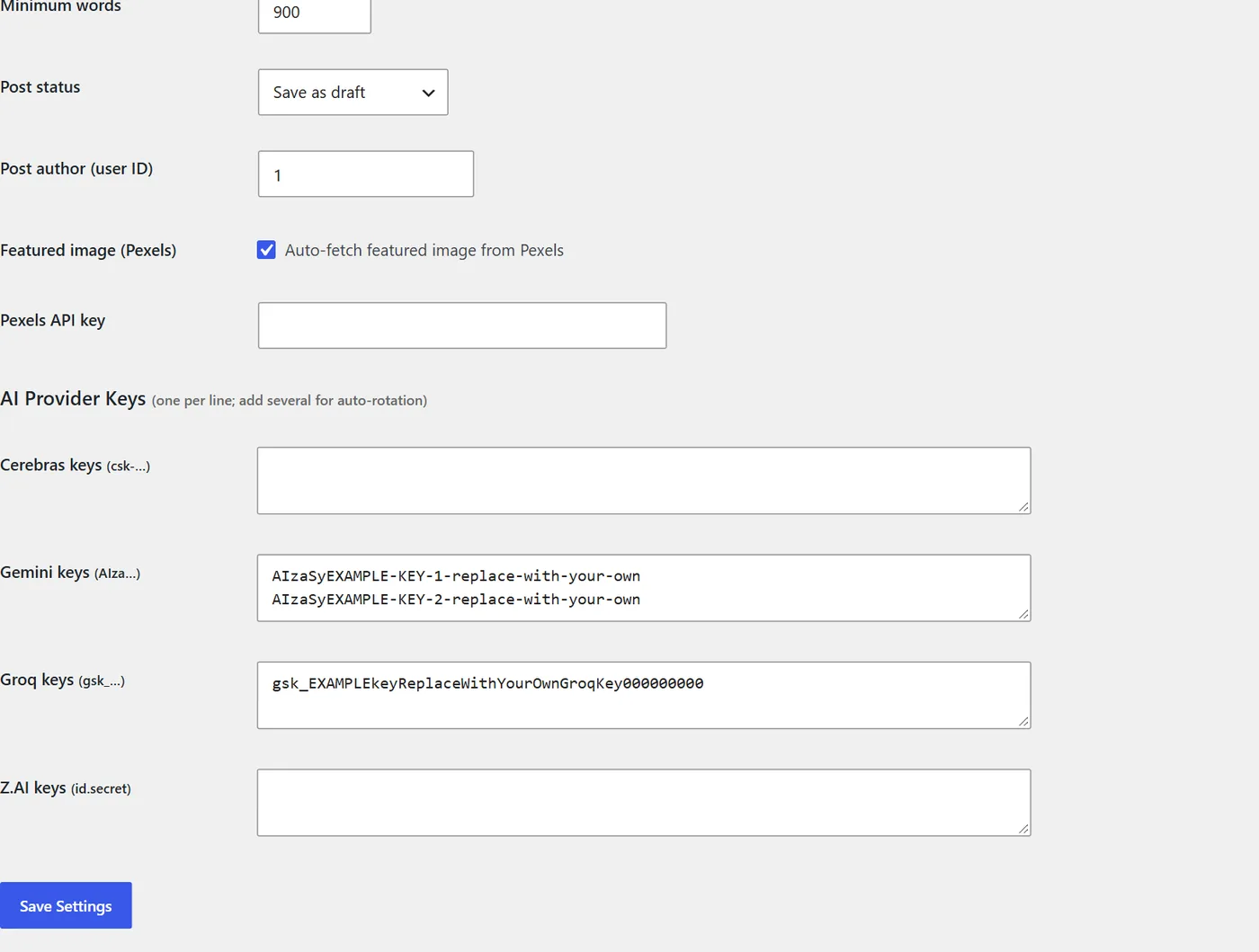
| Setting | Our recommendation |
|---|---|
| Articles per topic / day | 1. More articles per day mostly means thinner articles. |
| Sources synthesized per article | 3 — stronger synthesis, lower overlap with any one source. |
| Minimum words | 900–1,200. Our runs produced 970–1,300 words. |
| Post status | Save as draft until you trust the output. |
| Post author | The WordPress user ID of a real person who reviews the posts. |
Step 5 — Check your topics before generating
On the Run tab, click Preview sources next to a topic. It reads your reference sites and lists the matching articles — no AI call, no cost.
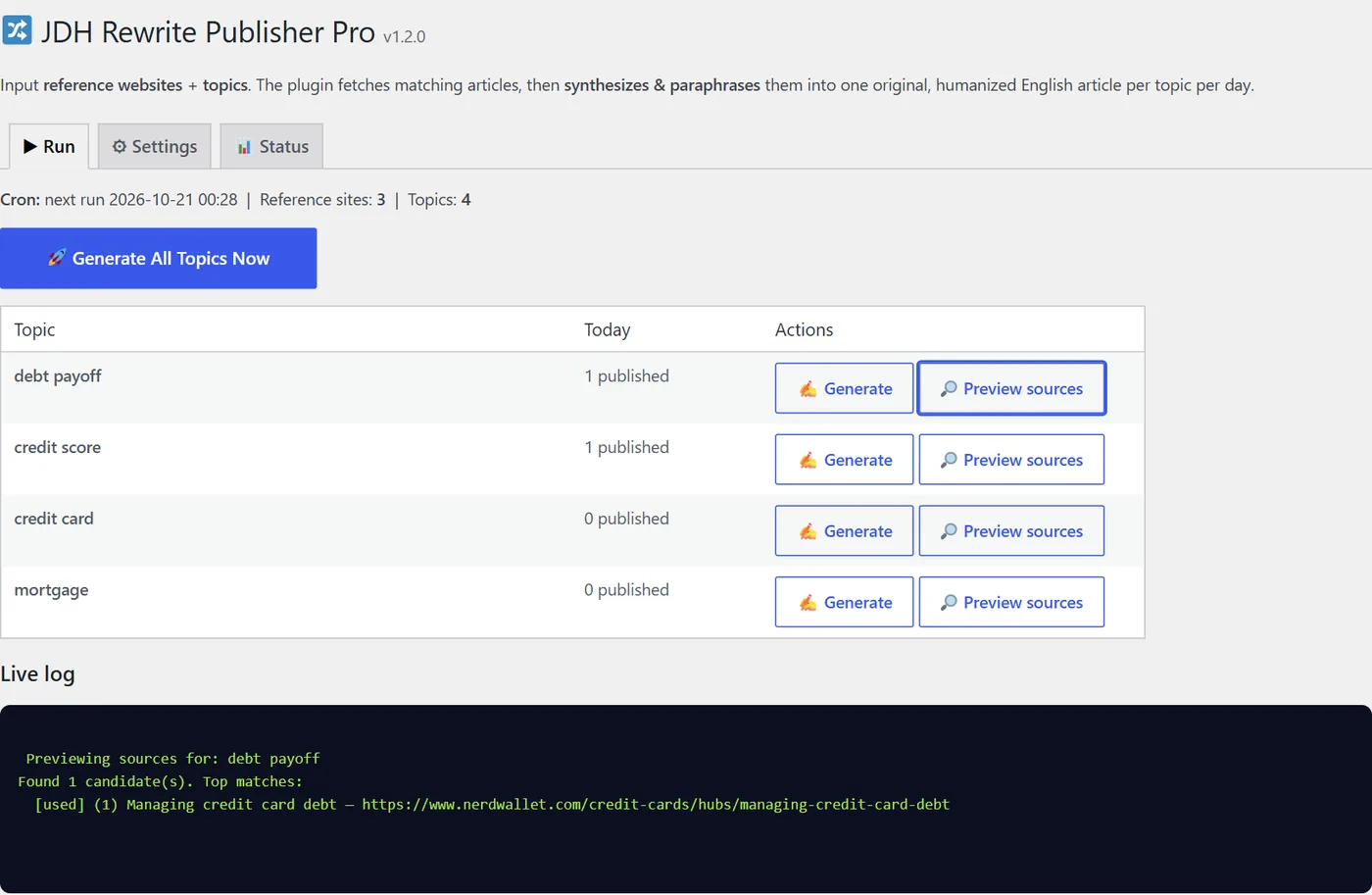
What we found on three finance sites
| Topic | Matching articles | Verdict |
|---|---|---|
| mortgage | 28 | Excellent |
| credit card | 25 | Excellent |
| saving money | 6 | Good |
| student loans | 3 | Thin — add a source |
| budget, investing, insurance, taxes | 0 | Change the topic or the sources |
Zero matches does not mean the sites never cover a subject — only that it is not in their current feeds or homepage links. Add a section URL (e.g. a site's “/investing/” page) as an extra source and preview again.
Step 6 — Generate your first article
Click Generate next to a topic with matches. The live log shows every step; a typical run takes 40–80 seconds.
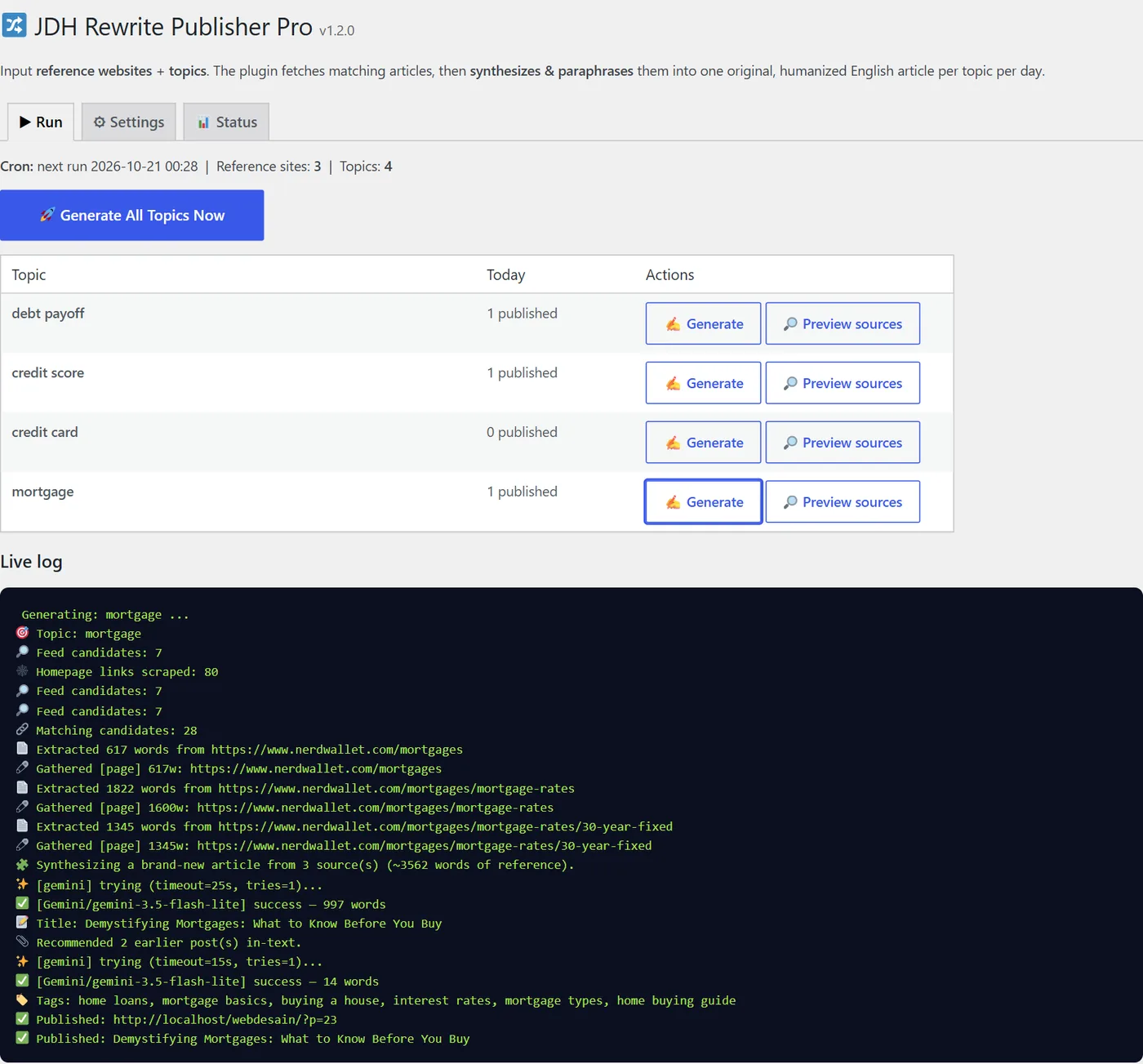
Reading the log: Matching candidates = articles that fit the topic · Extracted … words = text read from a source · Synthesizing = the AI call · success — 997 words = the draft length · Tags and Recommended 2 earlier posts = SEO extras · Published = the post was saved with your chosen status.
What comes out
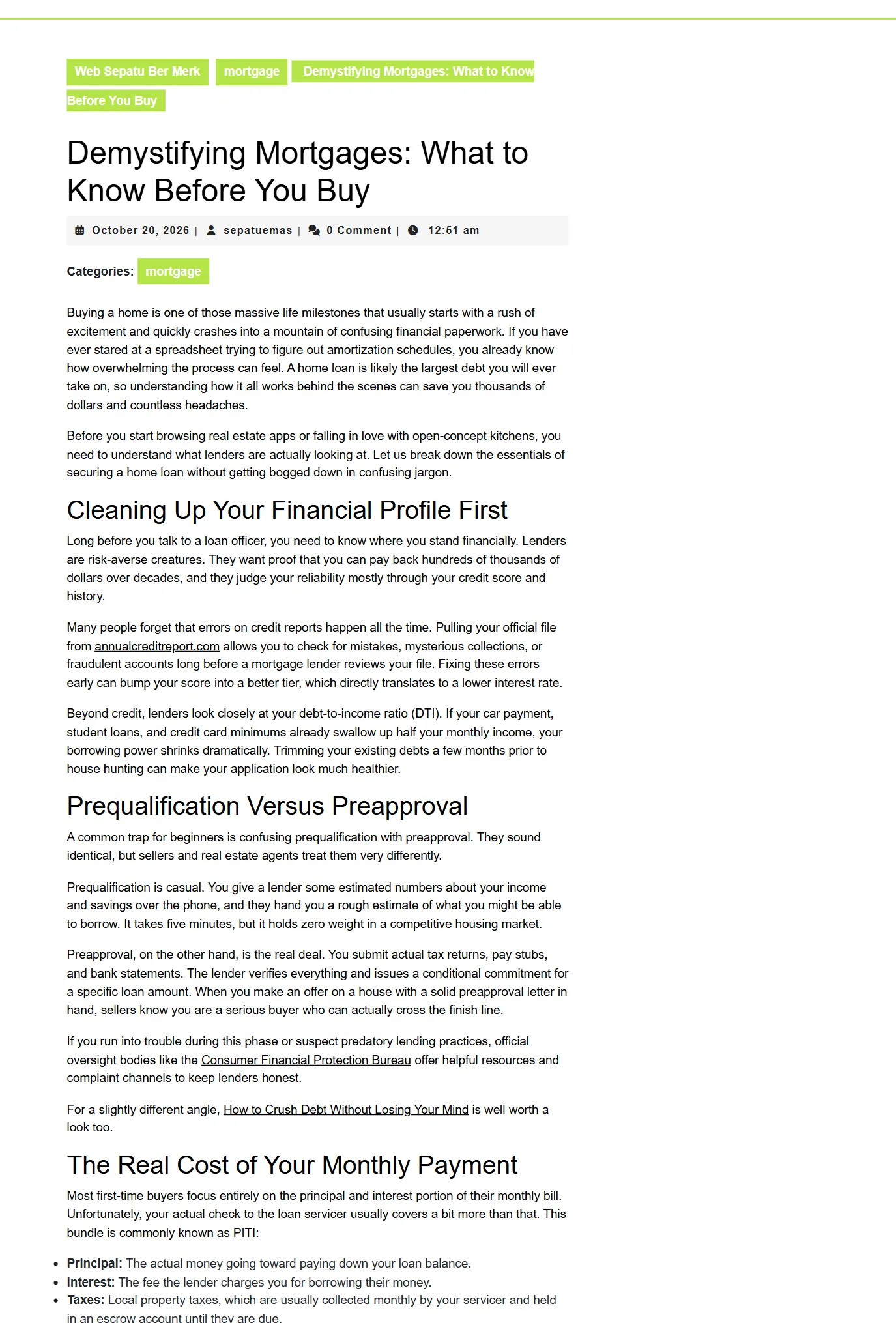
The mortgage article is 1,027 words in 5 sections with a bullet list, links to annualcreditreport.com and the CFPB (from the external-links setting), and two in-text links to earlier posts on the same site.
Check before publishing
- Facts, numbers and dates are correct and current.
- Nothing is advice you would not give yourself.
- The title matches what the article delivers.
- Add one thing only you know: an example, a number, an opinion.
- Cite the original sources you relied on.
- Pick or replace the featured image.
Ten minutes of editing per article is the difference between a useful post and generic filler.
Step 7 — Put it on a daily schedule
When the plugin is active it schedules a daily task (shown on the Run tab as Cron: next run …). Each run goes through every topic and respects the per-day quota, so clicking Generate manually earlier in the day does not create duplicates.
Why add a real cron job
WordPress's built-in scheduler (WP-Cron) only fires when someone visits your site. On a new or quiet site that can mean no post at all. A server cron job calls it on time:
- In cPanel open Cron Jobs, choose Once per hour (or every 15 minutes).
- Command (replace the domain):
wget -q -O - "https://yourdomain.com/wp-cron.php?doing_wp_cron" >/dev/null 2>&1 - Optional: add
define('DISABLE_WP_CRON', true);towp-config.phpso visits no longer trigger it.
A sensible weekly rhythm
| When | What |
|---|---|
| Daily (automatic) | One draft per topic. |
| Daily, 10 min per draft | Edit, fact-check, add your own example, publish. |
| Weekly | Preview sources for each topic; drop or replace topics that run dry. |
| Monthly | Check Search Console: which topics get impressions? Do more of those. |
Status tab and troubleshooting
| Log message | What it means | Fix |
|---|---|---|
| No articles matching "…" found | Topic not in the sources' feeds | Preview sources; change the topic or add a section URL. |
| Fetch blocked (HTTP 403) | The site refuses automated reading | The plugin uses the feed text instead; for better articles add another source. |
| rate-limited, cooldown set | Free-tier limit reached | Nothing — it retries later. Add a second provider. |
| out of credits (HTTP 402) | Free credits used up (Cerebras) | Key paused 1 hour; add other providers. |
| no available model (HTTP 404) | The provider retired its models | Update the plugin; keys are not marked dead. |
| key marked DEAD (auth) | Key wrong or revoked | Replace it, then click Reset dead keys. |
| Time budget nearly exceeded | Slow providers this time | Run again; prefer Gemini or Groq keys. |
| All providers and keys failed | No key worked on this run | Check the lines above it for the reason per provider. |
Use it responsibly — for readers, rankings and rights
An automated writer is only as good as the editorial process around it. Three rules keep your site on the right side of readers, search engines and publishers.
1. Do not publish at scale without review
Google's spam policies treat “scaled content abuse” — generating many pages mainly to manipulate rankings, with little value for users — as spam, regardless of whether a human or an AI wrote them. Google's guidance on AI content focuses on helpfulness, not on how text was produced. One reviewed, genuinely useful article per topic per day is the intended use; hundreds of unedited posts are not.
2. Respect the sources
- Choose sources whose terms allow reading and summarizing; skip sites that forbid automated access.
- The plugin writes new text, but you are the publisher: add a "Sources" line crediting the sites you drew on.
- Never present a source's original research, data or quotes as your own.
3. Add what only you can add
Experience, examples, numbers from your own work, a clear opinion. That is what makes a page worth ranking — and it is the part no plugin can write for you.
FAQ, license and support
Does it write in languages other than English?
This edition writes English articles. Your sources can be in any language, but English sources give the best results.
Can I use it on more than one site?
Yes — on websites you own or manage for your own business. Reselling or redistributing the plugin is not allowed.
Do I pay for AI?
Not to start: free tiers of Gemini, Groq, Cerebras and Z.AI are enough for a few articles a day. If you outgrow them, paid keys work the same way.
Will it overwrite or edit my existing posts?
No. It only creates new posts, and only links to older ones.
What happens if a run fails?
Nothing is published. The next scheduled run tries again, and the log tells you why.
Is it safe for my site?
It runs only in the admin area and on the schedule, stores settings in your own database, and contacts only your sources and the AI/Pexels APIs you configure.
Updates?
Version 1.x updates are free; we email buyers when a new version is available.
Changelog
- 1.2.0 (Oct 2026) — current model lists for all four providers with per-key model fallback; faster Gemini "flash-lite" first; low reasoning effort for gpt-oss models; Z.AI thinking off; HTTP 402 and 503 handled as temporary.
- 1.1.0 — tags, external links, in-article images, recommendations of earlier posts.