Small Business Software Budget Kit: honest review & user guide
By Dwi Taufik Hidayat · October 21, 2026 · We make this product — see the disclosure on page 2.
- Cover
- Verdict
- Seven leaks
- What's inside
- Step 1: List
- Flags
- Step 2: Dashboard
- Break-even
- Annual vs monthly
- Swap Planner
- Renewals
- The guide
- Worked example
- Limits
- FAQ
Small Business Software Budget Kit
An honest review and a step-by-step guide: audit every subscription, prove which tools pay for themselves, and cut or replace the rest.
- Spreadsheet for Excel and Google Sheets · up to 40 tools
- 17-page Cheaper-Alternative Guide included
- Every number here comes from the real file
The verdict in one page
What it is: a spreadsheet that turns a list of subscriptions into a clear picture — monthly and annual spend, spend by category, empty seats, duplicate tools, upcoming renewals — plus worksheets that test whether a tool pays for itself and whether switching is worth it. A 17-page guide covers where to find every subscription, what to swap in each category, negotiation scripts and safe cancellation.
What works well
- Automatic flags: unused 60+ days, unused seats, renewals within 30 days, same-category duplicates.
- Keep / Downgrade / Cancel decisions instantly show the monthly and yearly saving.
- Break-even and swap payback include your time, not just the price tag.
- Renewals sorted soonest first, so nothing renews by surprise.
Limits to know
- No automatic import from cards or accounts — listing tools takes about 30 minutes.
- The guide gives no vendor price list (prices change too fast); you check current prices yourself.
- Built for small teams: 40 tools in the audit.
- Value estimates (hours saved) are only as honest as your inputs.
Best for: owners and managers of small businesses, agencies and freelancers with 10–40 paid tools. Not for: large companies that need SaaS-management software with automatic discovery and approvals.
Why software spend leaks
Small businesses rarely overspend on one big tool. They overspend on many small ones. The kit looks for seven leaks:
| Leak | Looks like | How the kit shows it |
|---|---|---|
| Empty seats | 7 seats paid, 5 used | Unused-seat waste per tool and in total |
| Duplicates | Two video apps, two storages | "Same category as another tool" + categories with 2+ tools |
| Zombie tools | Not opened for two months | "Unused 60+ days" |
| Surprise renewals | Annual plan renews before anyone decides | Renewals tab + "Renews ≤30 days" |
| Over-bought tiers | Business plan, Starter features | Downgrade decision with the new price |
| Add-ons | Extra storage, contacts, credits | List them as their own rows |
| Silent price rises | Same tool, higher invoice | Use the latest invoice price |
What's inside
| Tab / file | What it does | You type? |
|---|---|---|
| Subscriptions | One row per tool: price, billing, seats, renewal, last used, owner, decision. Calculates monthly/annual cost, cost per used seat, waste, flags and saving. | Yes |
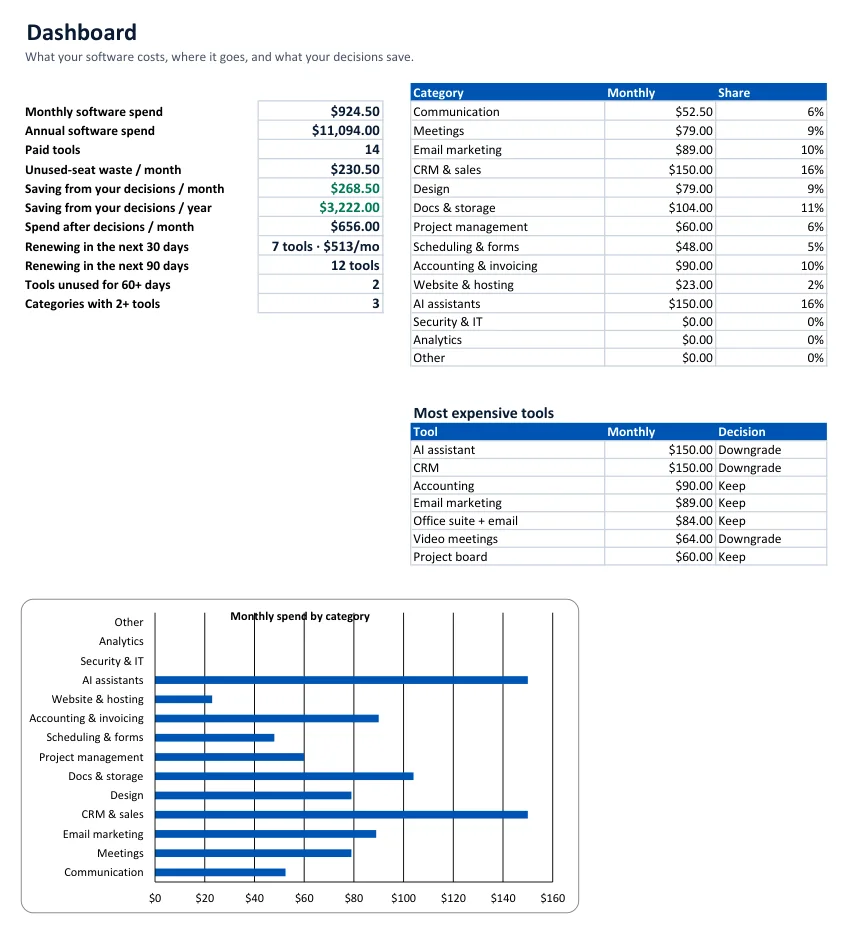
| Dashboard | Totals, savings from decisions, renewals in 30/90 days, unused tools, duplicate categories, spend by category, most expensive tools. | No |
| Break-even | Does each tool pay for itself? Net value, ROI, break-even hours, verdict. | Yes |
| Annual vs Monthly | Discount and the minimum months to keep a tool before annual is cheaper. | Yes |
| Swap Planner | Saving, switching cost (your hours + fees), payback months, year-1 saving, verdict. | Yes |
| Renewals | Every renewal sorted by date with days left and the decision. | No |
| Cheaper-Alternative Guide (PDF) | 17 pages: audit, decide, break-even, switching math, 5 category guides, negotiation, cancellation, 90-day plan. | Read |
Excel 2010+ and Google Sheets, standard functions only, no macros. We verified every calculation in Excel against hand calculations.
Step 1 — List every subscription
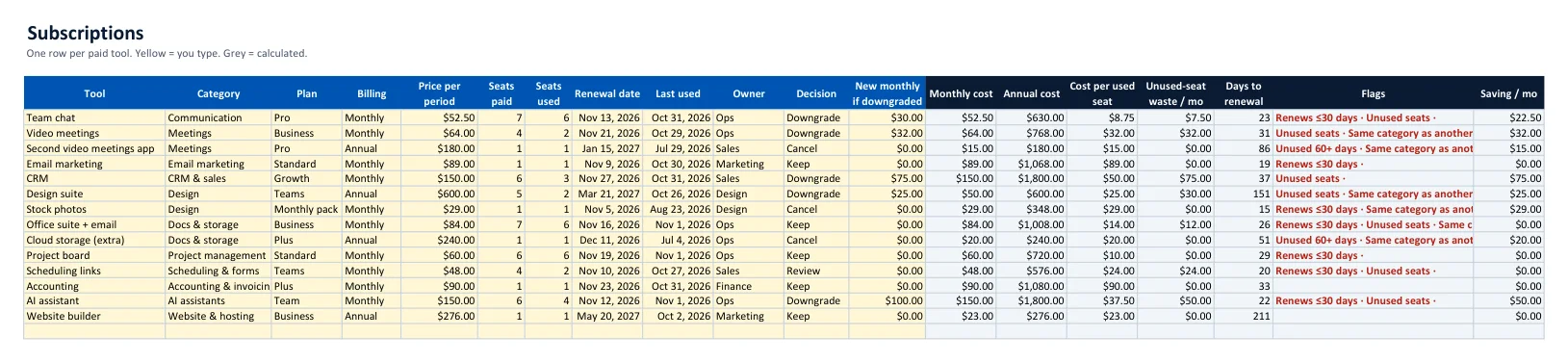
The guide's page 4 lists where to look: 13 months of card and bank statements (to catch annual plans), PayPal automatic payments, app-store subscriptions, inbox searches for receipt, invoice, renewal and trial ends, and your office suite's admin list of connected apps.
The automatic flags
| Flag | Rule | What to do |
|---|---|---|
| Unused 60+ days | Last used is 60+ days ago | Cancel unless someone can name why it is needed |
| Unused seats | Seats used < seats paid | Ask the vendor to remove seats now, not at renewal |
| Renews ≤30 days | Renewal date within 30 days | Decide before the date — annual plans are rarely refundable |
| Same category as another tool | Two or more tools in one category (except Other) | Keep one, cancel or downgrade the other |
Calculated columns
| Column | Formula |
|---|---|
| Monthly cost | Annual price ÷ 12, or the monthly price |
| Cost per used seat | Monthly cost ÷ seats used |
| Unused-seat waste | Monthly cost × (seats paid − seats used) ÷ seats paid |
| Saving / month | Cancel = monthly cost; Downgrade = monthly cost − new monthly |
Step 2 — Read the Dashboard
Step 3 — Does each tool pay for itself?
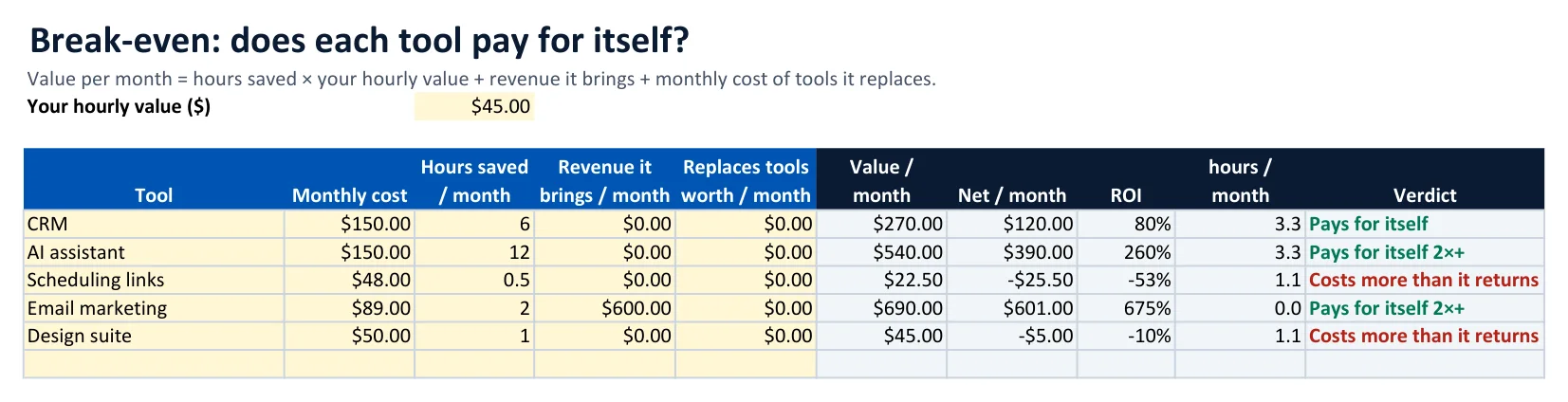
| Example ($45/hour) | Cost | Value | Net | Verdict |
|---|---|---|---|---|
| AI assistant, 12 h saved | $150 | $540 | +$390 | Pays for itself 2×+ |
| CRM, 6 h saved | $150 | $270 | +$120 | Pays for itself |
| Email marketing, 2 h + $600 sales | $89 | $690 | +$601 | Pays for itself 2×+ |
| Scheduling links, 30 min | $48 | $22.50 | −$25.50 | Costs more than it returns |
| Design suite, 1 h | $50 | $45 | −$5 | Costs more than it returns |
Step 4 — Annual or monthly?
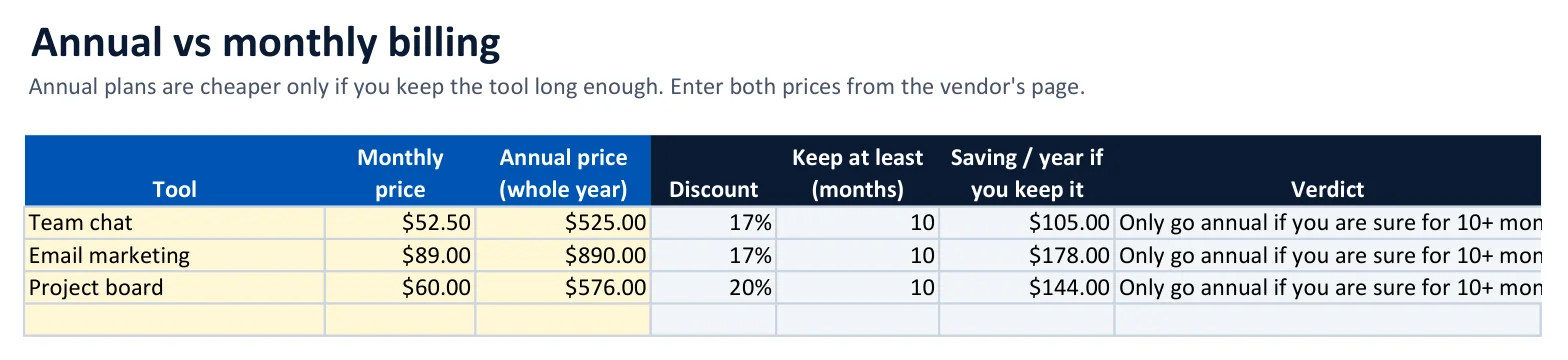
In the example, every annual plan needs about 10 months of use before it beats monthly billing, even with a 17–20% discount. Rule: go annual only for tools you have used for three months and are sure to keep all year; stay monthly for anything new or doubtful.
Step 5 — Is a cheaper tool really cheaper?

Payback = switching cost ÷ monthly saving
| Example | Saving / mo | Switching cost | Payback | Verdict |
|---|---|---|---|---|
| Paid video meetings → free tier | $64 | $90 | 1.4 months | Switch — pays back fast |
| Team scheduling → open-source tool | $36 | $180 | 5 months | Worth it within a year |
Step 6 — Never miss a renewal
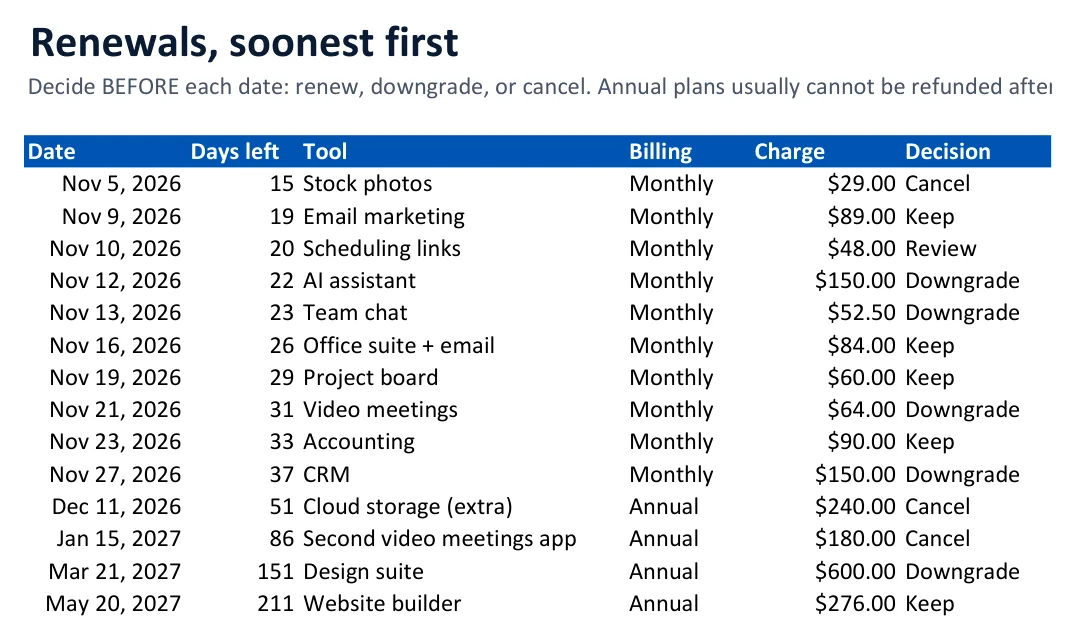
Put the next three renewals in your calendar 30 days ahead. That is the moment to downgrade, cancel or negotiate (scripts on page 14 of the guide).
The 17-page Cheaper-Alternative Guide
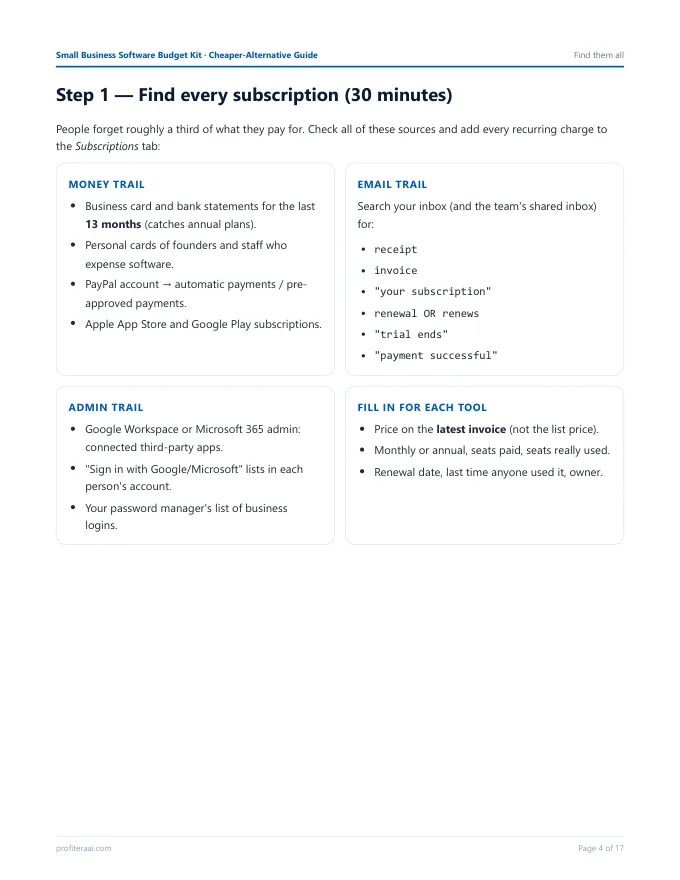
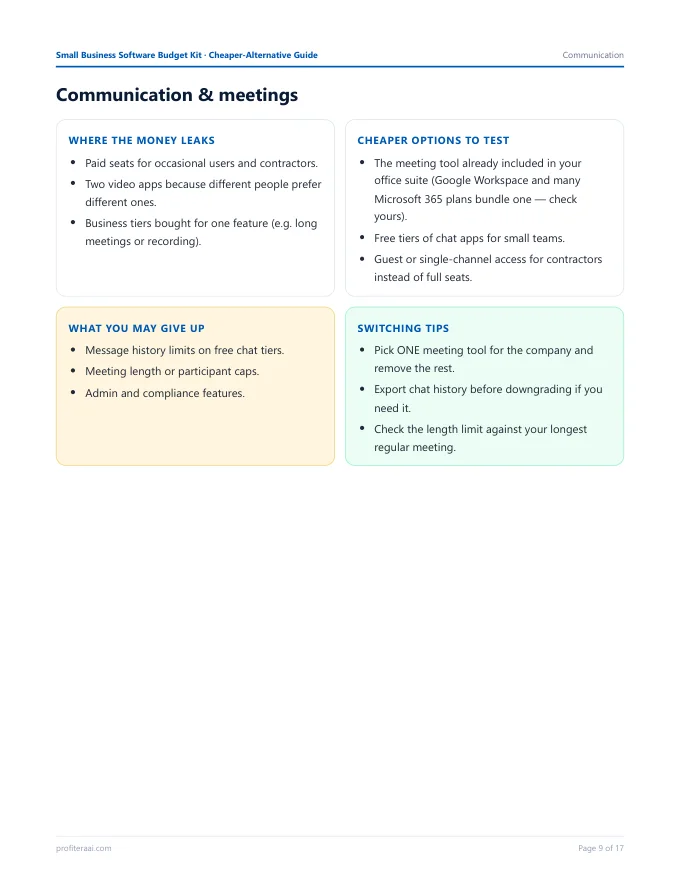
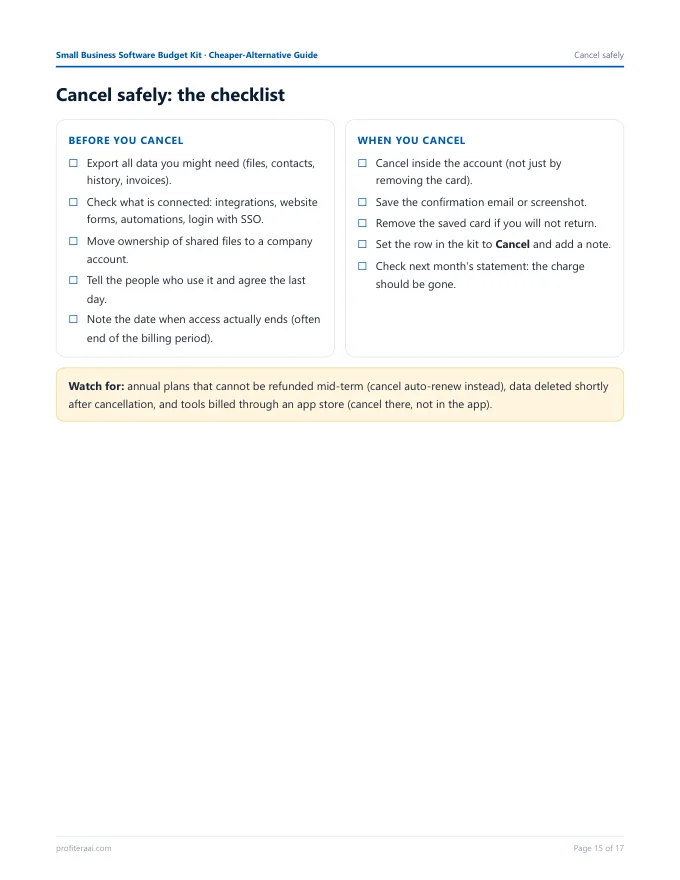
| Part | Pages |
|---|---|
| How to use · seven leaks · finding every subscription | 2–4 |
| Decide · break-even · annual vs monthly · switching math | 5–8 |
| Category guides: communication, marketing/CRM, design/docs, project/scheduling, finance/website/AI | 9–13 |
| Negotiation scripts · safe cancellation · 90-day plan · notes | 14–17 |
Each category page lists where the money leaks, cheaper options to test, what you may give up, and switching tips — without stale price lists.
Worked example: the 6-person team
The example rows (fictional) show how decisions add up:
| Tool (generic) | Monthly | Flag | Decision | Saving / mo |
|---|---|---|---|---|
| Team chat | $52.50 | Unused seats | Downgrade | $22.50 |
| Video meetings | $64.00 | Unused seats · duplicate | Downgrade | $32.00 |
| Second video meetings app | $15.00 | Unused 60+ days · duplicate | Cancel | $15.00 |
| CRM | $150.00 | Unused seats | Downgrade | $75.00 |
| Design suite | $50.00 | Unused seats · duplicate | Downgrade | $25.00 |
| Stock photos | $29.00 | Unused 60+ days | Cancel | $29.00 |
| Cloud storage (extra) | $20.00 | Unused 60+ days · duplicate | Cancel | $20.00 |
| AI assistant | $150.00 | Unused seats | Downgrade | $50.00 |
| Total | $268.50 / month |
Monthly spend falls from $924.50 to $656.00 — $3,222 a year — without touching the tools the team relies on every day.
Limits — and who it is not for
| Situation | Honest advice |
|---|---|
| More than 40 tools | You probably need SaaS-management software with automatic discovery and approval workflows. |
| Want prices of specific tools | Check each vendor's pricing page on the day you decide; the kit and guide show what to compare. |
| Accounting or tax tools | Change them only with your accountant, never mid-year. |
| Tools billed through app stores | Cancel in the app store, not inside the app. |
| Unsure how many hours a tool saves | Ask the people who use it; under-estimate rather than over-estimate. |
| Annual plan you want to leave mid-term | Usually not refundable — turn off auto-renew and plan the exit for the renewal date. |
The kit is a practical planning tool, not financial, legal, tax or procurement advice. It never contacts vendors or touches your accounts; every change is made by you.
FAQ
Does it work in Google Sheets? Yes — upload to Drive and open with Sheets.
How long does it take? About an hour the first time, then 15 minutes a quarter.
How do I get the files? A download button appears right after PayPal payment, and the link is emailed to you. 14-day money-back guarantee.